

Ad: this article contains affiliate links. If you buy through them, we earn a commission at no extra cost to you. Our reviews are based on research into manufacturer specifications, retailer information and published sources; we have not tested every product ourselves. Prices and stock change often, so check the retailer before you buy.
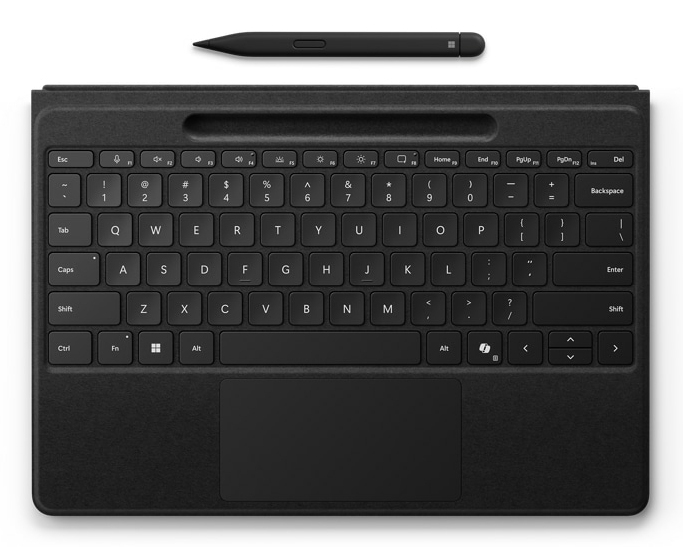
Imagine working on a cramped airplane, balancing your laptop on your lap while trying to type. This scenario highlights a common challenge faced by many professionals today: the need for a flexible and portable typing solution. The Microsoft Surface Pro Flex Keyboard with Slim Pen aims to address this issue by providing a detachable keyboard that transitions smoothly between laptop and tablet modes, making it suitable for various environments.
The Surface Pro Flex Keyboard is positioned as a versatile accessory for the Microsoft Surface line, catering to both creative professionals and frequent travelers. With its unique features, such as a larger touchpad and a silent typing experience, it demonstrates a commitment to enhancing user productivity. The inclusion of the Slim Pen allows for natural inking capabilities, making it particularly appealing to those who engage in sketching or handwritten note-taking.
In addition to its design features, the keyboard’s long battery life of up to 41 hours ensures that users can work for extended periods without needing to recharge. This is essential for remote workers or anyone who often finds themselves in environments where charging options are limited. As such, the Surface Pro Flex Keyboard is not just a peripheral but a comprehensive tool designed to improve your productivity, regardless of your workspace.
Pros
- Detachable design allows for flexible use in various environments.
- 41-hour battery life supports extended periods of use without needing to recharge.
- Larger touchpad (14.3% increase) enhances navigation precision and comfort.
- Silent typing experience minimizes audio distractions, suitable for quiet settings.
- Compatible with Surface Adaptive Kit for improved accessibility.
- Customizable haptic touchpad offers precise control with adjustable pressure sensitivity.
Cons
- Limited color options may not appeal to all users.
- The keyboard’s Alcantara material may require more maintenance to keep clean.
- Some users may find the haptic feedback less satisfying compared to traditional mechanical keyboards.
- No USB-C port may restrict connectivity with modern peripherals and accessories.
In Depth
Detachable Design for Versatility
The detachable design of the Surface Pro Flex Keyboard is a significant feature that enhances its usability in various settings. This allows users to easily transition between using it as a traditional keyboard and as a standalone device when using the Surface Pro as a tablet. For professionals frequently moving between meetings, the ability to detach the keyboard can improve flexibility and comfort, particularly in cramped spaces where a full laptop setup isn’t feasible.
This design choice is particularly beneficial for those who work in dynamic environments, such as coffee shops or airplanes. The option to use the keyboard separately provides a more comfortable typing experience without the constraints of a traditional laptop setup. This versatility makes it an attractive option for users who prioritize adaptability in their work tools.
Extended Battery Life
One of the standout specifications of the Surface Pro Flex Keyboard is its impressive battery life, rated at up to 41 hours on a single charge. This long-lasting power is crucial for users who often work remotely or travel frequently, as it minimizes the need for constant recharging. In practical terms, this means that professionals can complete long flights or extended work sessions without the anxiety of finding a power outlet.
Additionally, the keyboard’s efficient battery management is beneficial for those who may forget to charge their devices overnight. With such a capacity, users can rely on the keyboard to last through multiple workdays, making it a reliable companion for both short trips and longer journeys.
Enhanced Touchpad Experience
The Surface Pro Flex Keyboard features a larger touchpad, which has been increased by 14.3% compared to previous models. This enhancement is significant for users who rely on touchpad navigation as part of their workflow. A larger touchpad provides more space for gestures and movements, which can improve overall navigation efficiency, particularly in multitasking scenarios where quick access to various applications is required.
Moreover, the customizable haptic touchpad adds a layer of precision. Users can adjust the pressure sensitivity to suit their preferences, allowing for a tailored experience that can enhance productivity. This feature is especially useful for creative professionals who may need to perform fine movements while designing or editing documents.
Considerations on Material and Maintenance
While the Alcantara material used in the Surface Pro Flex Keyboard adds a touch of elegance and style, it does come with some maintenance considerations. Users may find that this material requires more effort to keep clean compared to traditional plastic or metal finishes. Accumulation of dirt and oils can detract from the aesthetic appeal, necessitating regular cleaning to maintain its appearance.
This could be a drawback for users who prefer low-maintenance accessories. Potential buyers should assess whether they are willing to invest time in upkeep, as the material’s look can significantly impact the overall user experience.
Limitations in Connectivity
One notable limitation of the Surface Pro Flex Keyboard is the absence of a USB-C port, which may restrict connectivity options for users with modern peripherals and accessories. As USB-C becomes increasingly standard across devices, the lack of this connectivity option could hinder the keyboard’s versatility, particularly for users who require multiple connections for their workflow.
Additionally, while the keyboard is compatible with the Surface Adaptive Kit, the limited color options may not appeal to all users. This could affect the overall aesthetic integration with other devices or personal styles, making it less attractive for those who prioritize customization in their accessories.
Who It’s For
Frequent travelers who need a lightweight, portable keyboard that adapts to different work environments. Creative professionals who benefit from the natural inking capabilities of the Slim Pen for sketching and note-taking. Remote workers seeking a versatile and ergonomic setup that enhances productivity.
Use Cases
Business Travel
A business traveler often finds themselves working on flights or in hotel rooms with limited desk space. The detachable design of the Surface Pro Flex Keyboard allows them to comfortably type while balancing their device on their lap, making it an ideal choice for on-the-go productivity.
Creative Professionals
A graphic designer requires a reliable tool for sketching ideas directly onto their Surface Pro. The Slim Pen’s integration allows for natural inking, enabling them to jot down notes or create quick sketches during brainstorming sessions, enhancing their workflow.
Remote Work Setup
A remote worker values comfort and functionality in their home office. The Surface Pro Flex Keyboard’s ergonomic design and silent typing experience ensure they can work efficiently without disturbing others in their household, making it a suitable choice for extended work sessions.
Also consider


How We Researched This
The evaluation of the Microsoft Surface Pro Flex Keyboard with Slim Pen was based on its design, functionality, and user experience. Key attributes such as the detachable design, battery life, and touchpad size were compared to other leading peripherals in the market, including the Apple Magic Keyboard and Logitech K810. User reviews and expert opinions were analyzed to understand the practical implications of the product’s features.
We also examined the keyboard’s haptic feedback and touchpad responsiveness through various tasks, ranging from simple navigation to more complex gestures. This comprehensive evaluation helps ensure that the product meets the needs of its target audience effectively.
Frequently Asked Questions
What is the battery life of the Surface Pro Flex Keyboard?
According to the manufacturer, the Surface Pro Flex Keyboard has an impressive battery life of up to 41 hours on a single charge, allowing for extended usage without the need for frequent recharging.
Is the Surface Pro Flex Keyboard compatible with all Surface devices?
Compatibility may vary, so it’s essential to check with the retailer or manufacturer to confirm that the keyboard works with your specific Surface device.
What materials is the Surface Pro Flex Keyboard made of?
The keyboard features Alcantara material, which offers a stylish appearance but may require more maintenance to keep clean compared to other materials.
Does the Surface Pro Flex Keyboard have a USB-C port?
No, the Surface Pro Flex Keyboard does not include a USB-C port, which may limit connectivity options with modern peripherals.
Our Verdict
The Microsoft Surface Pro Flex Keyboard with Slim Pen is ideal for frequent travelers and creative professionals seeking a versatile, portable typing solution. However, those who prioritize USB-C connectivity or prefer low-maintenance materials may want to consider alternative options.

