

Ad: this article contains affiliate links. If you buy through them, we earn a commission at no extra cost to you. Our reviews are based on research into manufacturer specifications, retailer information and published sources; we have not tested every product ourselves. Prices and stock change often, so check the retailer before you buy.
In the heat of competitive gaming, the importance of a responsive and comfortable keyboard cannot be overstated. Gamers often find themselves at a disadvantage due to equipment that lags in responsiveness or fails to provide the necessary comfort for extended play. The ASUS ROG Falcata keyboard addresses these concerns with its thoughtful design and advanced technology, making it a compelling option for serious gamers.
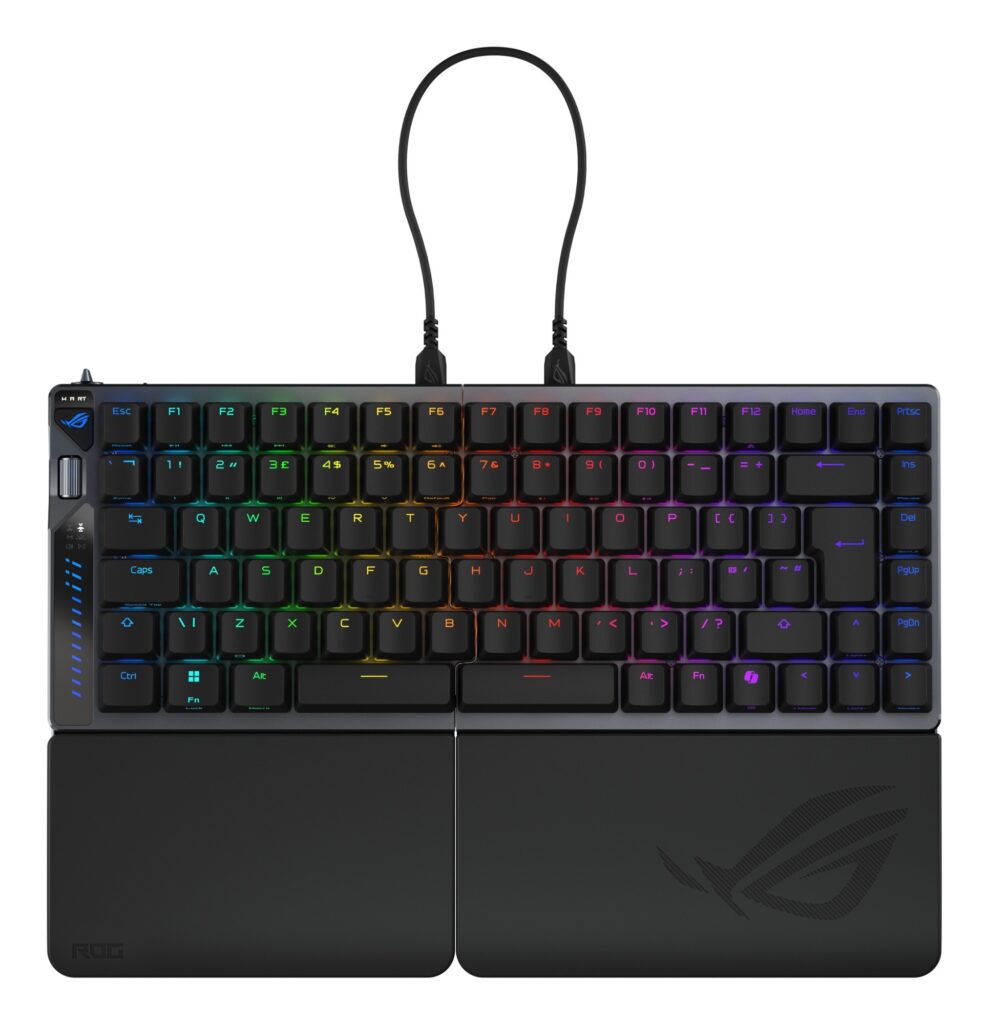
The Falcata is a 75% split gaming keyboard that combines a compact layout with performance-enhancing features. Designed with hot-swappable ROG HFX V2 Magnetic Switches and ROG Hall Sensor technology, it promises an ultra-responsive typing experience. Its tri-mode connectivity ensures that whether you prefer wired or wireless setups, you have options that minimize lag, which is critical during fast-paced gaming sessions.
Additionally, the ergonomic design of the Falcata, complete with a detachable silicone wrist rest, caters to user comfort, enabling longer gaming marathons without discomfort. As gamers increasingly prioritize both performance and comfort, the Falcata aims to meet these demands effectively, positioning itself as a suitable choice in the mid to high-end gaming keyboard market.
Pros
- Hot-swappable ROG HFX V2 Magnetic Switches for customizable typing experience.
- ROG Hall Sensor technology provides ultra-responsive keystrokes.
- Tri-mode connectivity (USB, RF Wireless, Bluetooth) for versatile use.
- Rapid Trigger toggle and multi-function wheel enhance control.
- Zone Mode optimizes hardware settings for gaming performance.
- Four-layer dampening significantly reduces noise during typing.
Cons
- 75% layout may not suit users accustomed to full-sized keyboards.
- Wireless connectivity can face interference in crowded environments.
- Detachable wrist rest may not provide enough support for all users.
- Limited RGB lighting customization compared to some competitors.
- Higher price point compared to basic gaming keyboards.
In Depth
Advanced Switch Technology
The ASUS ROG Falcata features hot-swappable ROG HFX V2 Magnetic Switches, allowing users to customize their typing experience. This means that gamers can easily change the switches to suit their preferences, whether they favor tactile feedback or linear keystrokes. The magnetic mechanism enhances responsiveness, ensuring that every keystroke registers quickly, which is particularly beneficial in competitive scenarios where timing is crucial.
In practice, this technology translates to a keyboard that can adapt to different gaming styles. Users can experiment with various switches to find the perfect match for their gameplay, providing a level of personalization that is often absent in many standard keyboards. This feature is especially useful for gamers who participate in different genres, as it allows for adjustments that can enhance performance in specific games.
Connectivity Options
The Falcata offers tri-mode connectivity, including USB, RF Wireless, and Bluetooth, providing flexibility for different setups. This versatility is essential for gamers who may want to switch between devices or use the keyboard in various environments, whether gaming on a PC or a console.
With ROG SpeedNova 8K wireless technology, the keyboard minimizes lag and ensures a stable connection, which is crucial during competitive play. This feature allows for quick reflexes and a smooth gaming experience, as any delay can result in missed opportunities in fast-paced gaming scenarios.
Ergonomic Design for Comfort
The ergonomic design of the Falcata includes a detachable silicone wrist rest that aims to enhance user comfort during extended gaming sessions. This feature is significant, as many gamers spend hours at their keyboards, and discomfort can lead to fatigue and decreased performance.
However, it is important to note that while the wrist rest is a thoughtful addition, it may not provide sufficient support for all users. Potential buyers should consider their personal comfort needs and may want to test the keyboard to ensure the wrist rest meets their expectations before making a purchase.
Noise Reduction Features
One of the standout features of the Falcata is its four-layer dampening system, which significantly reduces noise during typing. This can be particularly beneficial in shared living spaces or during late-night gaming sessions where noise could disturb others.
The noise reduction not only contributes to a more pleasant gaming experience but also allows for clearer communication during multiplayer games. Gamers who prioritize a quieter setup will appreciate this feature, making the Falcata suitable for both casual and competitive scenarios.
Limitations and Considerations
Despite its many advantages, the Falcata has some limitations that potential buyers should consider. The 75% layout may not suit users who are accustomed to full-sized keyboards, as it lacks a dedicated number pad and some additional keys that can be useful for productivity tasks.
Additionally, while the wireless connectivity is generally reliable, it can face interference in crowded environments, which could disrupt performance during critical gaming moments. Buyers should also be aware that the RGB lighting customization options are somewhat limited compared to competitors, which may be a drawback for those who prioritize aesthetics in their setup.
Who It’s For
Competitive gamers requiring a responsive and customizable keyboard.
Content creators who benefit from the multi-function wheel for editing tasks.
Users with limited desk space looking for a compact keyboard solution.
Use Cases
Competitive Gaming Tournaments
In a high-stakes gaming tournament, the Falcata’s ultra-responsive switches and low-latency connectivity can make a significant difference in performance. Gamers can rely on its fast response times to execute commands quickly, giving them an edge over opponents.
Content Creation and Editing
For content creators, the multi-function wheel provides easy access to editing tools, enhancing workflow efficiency. The customizable switches allow for a tailored typing experience, making it suitable for long hours of video editing or graphic design.
Compact Gaming Setups
In a compact gaming setup, the Falcata’s 75% layout saves valuable desk space while still providing essential features. Its wireless capabilities allow for a clean and clutter-free appearance, ideal for minimalistic setups.
Also consider


How We Researched This
This review is based on the manufacturer’s specifications and published information regarding the ASUS ROG Falcata keyboard. Key features such as switch technology, connectivity options, and ergonomic design were compared with similar products in the 75% keyboard category.
Competing models from brands like Corsair and Razer were assessed for their responsiveness, ease of customization, and overall comfort during extended use. Specific attributes, including the hot-swappable feature and advanced ROG Hall Sensor technology, were analyzed to provide a comprehensive understanding of the Falcata’s advantages and limitations in the gaming keyboard market.
Frequently Asked Questions
What switch types are compatible with the Falcata?
The Falcata features hot-swappable ROG HFX V2 Magnetic Switches, allowing users to customize their typing experience with different switch types.
Can I connect the Falcata to multiple devices?
Yes, the Falcata offers tri-mode connectivity, allowing you to connect via USB, RF Wireless, or Bluetooth, making it versatile for different devices.
Is the wrist rest adjustable?
The wrist rest is detachable, but it is not adjustable. Users should consider their comfort needs to determine if it provides adequate support.
Our Verdict
The ASUS ROG Falcata keyboard is well-suited for competitive gamers and content creators seeking a responsive and customizable experience. However, users accustomed to full-sized keyboards may find the 75% layout limiting. Before purchasing, ensure the wrist rest meets your comfort requirements.

