Ad: this article contains affiliate links. If you buy through them, we earn a commission at no extra cost to you. Our reviews are based on research into manufacturer specifications, retailer information and published sources; we have not tested every product ourselves. Prices and stock change often, so check the retailer before you buy.
In an era where desk space is at a premium, the Acer Veriton Vero Mini VVN6735GT Desktop Computer offers a solution for those seeking a powerful yet compact computing solution. With its sleek mini chassis design, this computer addresses the need for high performance without the bulk of traditional desktops. It is particularly suitable for small office setups, home workstations, or educational environments, where efficiency and space-saving are critical.
The Veriton Vero Mini VVN6735GT is positioned as a mid-range desktop computer, equipped with an Intel Core Ultra 5 processor, 16 GB of RAM, and a 512 GB SSD. This configuration allows it to handle a variety of tasks, from basic office applications to more demanding workloads such as multitasking and data processing. The device runs on Windows 11 Pro, providing a modern operating system experience right out of the box.
One of the key selling points of the Veriton Vero Mini is its energy efficiency and eco-friendly design, which aligns with current sustainability trends. This makes it an appealing choice for users who are environmentally conscious while still needing robust computing power.
Pros
- Compact design suitable for small spaces
- Powerful Intel Core Ultra 5 processor for multitasking
- 16 GB DDR5 RAM for efficient performance
- 512 GB SSD for fast boot and load times
- Wide range of connectivity options including USB-C and HDMI
- Energy-efficient operation aligns with sustainability trends
Cons
- Limited storage capacity may require external solutions
- No discrete graphics card limits gaming and graphic performance
- Mini PC form factor restricts upgrade options
- Higher running costs associated with regular desktop use
In Depth
Processor Performance and Efficiency
The Acer Veriton Vero Mini is powered by the Intel Core Ultra 5 processor model 235, featuring a base frequency of 3.4 GHz and a boost frequency of up to 4.9 GHz. This dual-core architecture, which includes 6 performance cores and 8 efficient cores, allows for smooth multitasking and efficient processing of demanding applications. The 14 threads provided by the CPU enable users to run multiple applications simultaneously without significant lag, making it an ideal choice for productivity.
In practical terms, this means that users can comfortably engage in tasks such as video conferencing, web browsing, and document editing at the same time. The processor’s performance is complemented by a 24 MB Smart Cache, which enhances data retrieval speeds, further improving overall responsiveness. This level of performance makes the Veriton Vero Mini suitable not only for basic tasks but also for more intensive applications such as light graphic design or data analysis.
Memory and Storage Capabilities
Equipped with 16 GB of DDR5-SDRAM, the Veriton Vero Mini provides ample memory for both everyday tasks and more demanding applications. The DDR5 memory type, with a data transfer rate of 5600 MT/s, ensures that the system operates efficiently, reducing loading times and improving the performance of memory-intensive applications.
The 512 GB SSD storage not only offers a decent amount of space for files and applications but also significantly enhances boot and load times compared to traditional HDDs. Users can expect quick access to their data, which is particularly beneficial in a fast-paced work environment. However, those with extensive storage needs may find the capacity limiting and might need to consider external storage solutions.
Connectivity Options
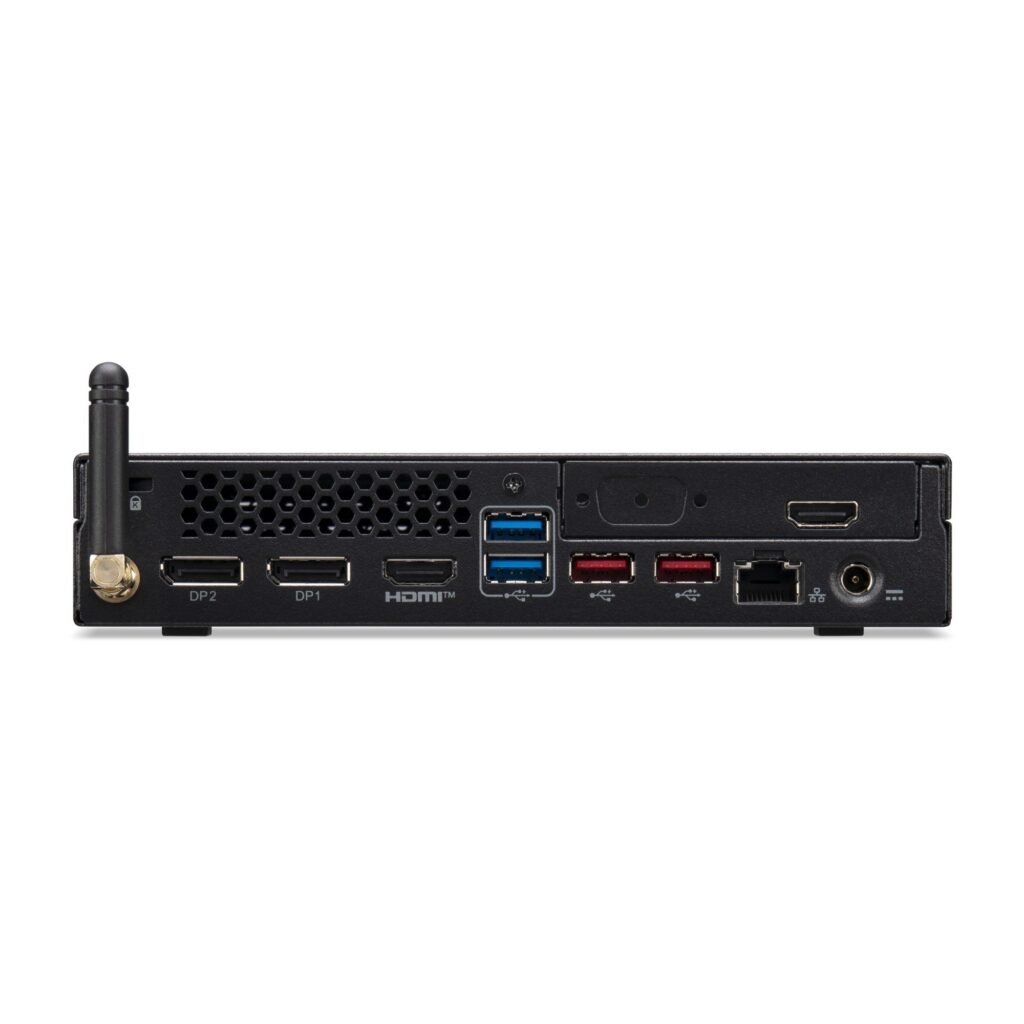
The Veriton Vero Mini includes a robust array of connectivity options, making it versatile for various setups. It features multiple USB ports, including two USB 3.2 Gen 1 Type-A, four USB 3.2 Gen 2 Type-A, and one USB 3.2 Gen 2×2 Type-C port. This variety allows users to connect a range of peripherals, from external drives to printers, without needing additional hubs.
Furthermore, the inclusion of HDMI and DisplayPort outputs ensures compatibility with modern displays, supporting high-resolution output. The device also supports Wi-Fi 6E, which is beneficial for users in high-density environments where multiple devices are connected, providing better bandwidth management and faster internet speeds.
Physical Design and Dimensions
The compact design of the Veriton Vero Mini is a significant advantage for users with limited desk space. Measuring just 186.3 mm in width and depth, and only 36.2 mm in height, it can easily fit into tight spaces, making it suitable for both home and office environments.
Despite its small size, the device does not compromise on performance. Weighing approximately 1.3 kg, it can be easily moved if required, and its minimalistic black chassis ensures it blends well with various decor styles. However, users looking for a more customizable setup might find the limited upgrade options due to its mini PC form factor a drawback.
Limitations and Running Costs
While the Acer Veriton Vero Mini VVN6735GT is a capable machine, it does have some limitations. The absence of a discrete graphics card means it is not suited for high-end gaming or graphic-intensive applications. Users requiring advanced graphics capabilities may need to look at alternatives that offer dedicated GPUs.
Additionally, the power supply of 135 W is relatively efficient, but users should be aware of the potential running costs associated with using a desktop computer regularly. Although it is designed to be energy-efficient, prolonged use could still contribute to electricity expenses, particularly if used for resource-heavy tasks.
Who It’s For
Small business owners needing efficient workstations
Students looking for a compact PC for study and multimedia
Home office users requiring reliable performance in limited space
Use Cases
Home Office Setup
For remote workers, the Veriton Vero Mini serves as an ideal desktop solution, providing sufficient processing power for video calls, document editing, and project management tools without taking up much desk space.
Educational Use
In a classroom or study environment, this mini PC can handle various educational software, enabling students to engage in learning activities without the clutter of larger traditional desktops.
Small Business Applications
Small business owners can utilize the Veriton Vero Mini for everyday tasks such as invoicing, email management, and inventory tracking, all while benefiting from its energy-efficient design.
Also consider


How We Researched This
This review is based on the manufacturer’s specifications, retailer data, and widely published information about the Acer Veriton Vero Mini VVN6735GT. Key attributes such as the processor type, memory, storage, and connectivity options were examined to assess performance and suitability for various use cases.
Additionally, comparisons were made with similar products in the mini PC category, focusing on aspects like processing power, energy efficiency, and physical design. Competitors were evaluated based on their specifications and user reviews to ensure a comprehensive understanding of the product’s positioning in the market.
Frequently Asked Questions
What operating system is installed on the Veriton Vero Mini?
The Acer Veriton Vero Mini comes pre-installed with Windows 11 Pro, offering a modern user experience and enhanced features.
Is there a warranty for this product?
Warranty details should be confirmed with the retailer or manufacturer, as they can vary based on the purchase location.
Does the Veriton Vero Mini support dual monitors?
Yes, it supports dual monitors through its HDMI and DisplayPort outputs, allowing for an extended workspace.
Our Verdict
The Acer Veriton Vero Mini VVN6735GT is a solid choice for users who need a compact desktop computer that delivers reliable performance for everyday tasks and moderate multitasking. However, those requiring high-end graphics capabilities or extensive upgrade options may need to explore alternative solutions.
Where to buy
Best for: Small business owners needing efficient workstations
We earn a commission if you buy through these links, at no extra cost to you. How we make money