Ad: this article contains affiliate links. If you buy through them, we earn a commission at no extra cost to you. Our reviews are based on research into manufacturer specifications, retailer information and published sources; we have not tested every product ourselves. Prices and stock change often, so check the retailer before you buy.
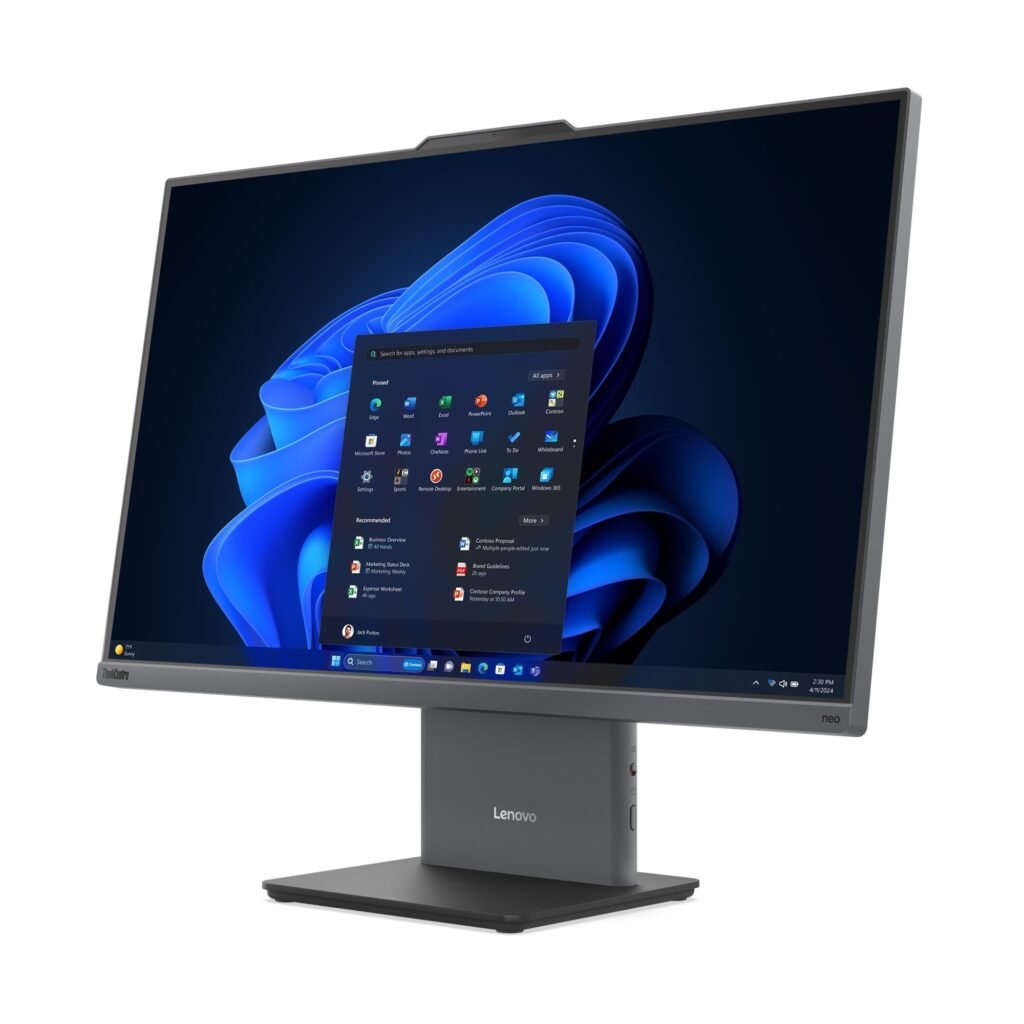
In an age where remote work and home offices are becoming the norm, many users seek an efficient and space-saving computing solution. The Lenovo ThinkCentre neo 50a 24 Gen 6 LNL presents itself as a viable option, merging performance with a compact design. This all-in-one PC features a 23.8-inch full HD display, Intel’s latest Ultra processors, and a range of connectivity options, making it suitable for both professional and personal use.
With a focus on multitasking, the neo 50a is equipped with an Intel Core Ultra 7 processor and 16 GB of LPDDR5x RAM, ensuring that it can handle demanding applications and workflows. Its design is tailored for users who require a robust computing experience without the clutter of multiple devices. The inclusion of Windows 11 Pro further enhances its appeal, as it provides access to the latest features and security updates.
Positioned in the mid-range segment of Lenovo’s offerings, this all-in-one PC aims to cater to users who need a reliable workstation without the high costs associated with premium models. Its combination of specifications and price point may attract professionals, students, and families alike, but how does it perform in real-world scenarios? Let’s look deeper into its features and performance metrics.
Pros
- Compact all-in-one design saves space
- Full HD display covers 99% of sRGB color gamut
- Fast SSD storage with PCIe 4.0 for quick access
- Robust connectivity options including Wi-Fi 6
- Good multitasking performance with Intel Core Ultra 7
- Built-in webcam and speakers for video calls
Cons
- Limited display brightness at 250 cd/m²
- Integrated graphics may not support high-end gaming
- No USB-C ports for modern peripherals
- Audio quality may not satisfy audiophiles
- No touchscreen functionality
In Depth
Display Quality and Usability
The Lenovo ThinkCentre neo 50a has a 23.8-inch IPS display with a resolution of 1920 x 1080 pixels. This full HD screen provides decent clarity and color reproduction, covering 99% of the sRGB color gamut. Such specifications make it suitable for tasks that require accurate color representation, such as graphic design or photo editing. The anti-glare coating also aids in reducing reflections, which is beneficial in brightly lit environments.
However, the display’s brightness is rated at 250 cd/m², which may not be sufficient for all users, particularly those working in very bright conditions. While the screen is adequate for general use, users seeking vibrant visuals for multimedia or high-end gaming may find it lacking compared to higher-end models that offer better brightness and contrast ratios.
Performance Capabilities
At the heart of the neo 50a is the Intel Core Ultra 7 256V processor, featuring eight cores and a maximum turbo frequency of 4.8 GHz. This architecture is particularly effective for multitasking, allowing users to run multiple applications smoothly without significant slowdowns. The 16 GB of LPDDR5x RAM further supports this capability, ensuring that tasks such as video conferencing, document editing, and web browsing can occur simultaneously without performance degradation.
In practical terms, this means that users can expect responsive performance in everyday tasks, making it suitable for office work, online classes, and casual gaming. However, for heavy-duty tasks like 3D rendering or advanced gaming, the integrated Intel Arc Graphics 140V may not provide the necessary power, indicating a limitation for users with more intensive graphical needs.
Storage and Connectivity Options
The Lenovo ThinkCentre neo 50a is equipped with a 512 GB SSD, which utilizes PCI Express 4.0 technology. This offers fast read and write speeds, significantly reducing load times for applications and files. The SSD also provides ample storage for documents, media, and software, making it a practical choice for users who require quick access to data.
Connectivity options are robust, featuring multiple USB ports, HDMI outputs, and Ethernet capabilities. The inclusion of Wi-Fi 6 (802.11ax) enhances wireless performance, allowing for faster and more reliable internet connections. However, the absence of USB-C ports may limit compatibility with newer peripherals, necessitating the use of adapters for some users.
Audio and Webcam Features
The audio system in the neo 50a is powered by Realtek ALC233 and includes two built-in speakers rated at 6 W total power. While the audio quality is decent for everyday tasks like video calls and streaming, audiophiles may find it underwhelming. The sound output is adequate for casual listening but lacks the depth and clarity found in dedicated audio systems.
Additionally, the all-in-one features a built-in 5 MP webcam, which is suitable for video conferencing. The camera quality is adequate for most professional settings, but it may not meet the standards of users who require higher resolution for streaming or content creation.
Limitations and Running Costs
While the Lenovo ThinkCentre neo 50a offers a solid set of features, it does come with some limitations. The integrated graphics may restrict users looking to engage in high-end gaming or graphic-intensive applications, pushing them towards dedicated graphics solutions instead. Furthermore, the lack of a touchscreen may deter users who prefer interactive displays for their workflow.
In terms of running costs, the power consumption is rated at a maximum of 37 W during peak usage. This efficiency is beneficial for users conscious of energy costs, but it is essential to consider that the performance limits may necessitate upgrades or additional hardware for specific tasks, potentially increasing overall expenditure.
Who It’s For
Remote workers needing a compact workstation
Students requiring reliable performance for studies
Families looking for a versatile home computer
Use Cases
Home Office Setup
For individuals working from home, the Lenovo ThinkCentre neo 50a provides a streamlined solution with its all-in-one design. The reliable performance and decent display make it suitable for video calls, document editing, and web browsing, ensuring productivity without the clutter of multiple devices.
Student Use
Students can benefit from the neo 50a’s multitasking capabilities, allowing them to run various educational applications simultaneously. Its compact size makes it easy to fit into dorm rooms or shared spaces, while the integrated webcam facilitates online classes.
Family Computing Needs
Families can utilize the Lenovo ThinkCentre neo 50a for everyday tasks such as browsing, streaming, and light gaming. Its all-in-one design helps keep living spaces tidy, while the performance is sufficient for casual use by multiple family members.
Also consider

How We Researched This
This review is based on the manufacturer’s specifications, retailer data, and published information regarding the Lenovo ThinkCentre neo 50a 24 Gen 6 LNL. Key aspects such as display quality, processing power, and connectivity options were assessed to determine the product’s suitability for various user needs. Comparisons were made with similar all-in-one PCs in the market to gauge performance and value.
Factors such as RAM, storage type, and integrated graphics capabilities were considered essential for evaluating multitasking performance and overall usability. The review aims to provide a comprehensive understanding of this product’s strengths and limitations, ensuring potential buyers have the information needed to make an informed decision.
Frequently Asked Questions
What operating system does it come with?
The Lenovo ThinkCentre neo 50a comes with Windows 11 Pro pre-installed, providing access to the latest features and security updates.
Can I upgrade the RAM?
The Lenovo ThinkCentre neo 50a has a maximum internal memory of 16 GB, and it comes with this amount pre-installed. Upgrading is not possible as the RAM is onboard.
Does it have a touchscreen?
No, the Lenovo ThinkCentre neo 50a does not feature a touchscreen display, which may limit interactivity for some users.
Our Verdict
The Lenovo ThinkCentre neo 50a 24 Gen 6 LNL is a capable all-in-one PC suitable for home office use, education, and family computing. However, users needing high-end graphics capabilities or advanced audio performance may want to explore alternatives.
Where to buy
Best for: Remote workers needing a compact workstation
We earn a commission if you buy through these links, at no extra cost to you. How we make money