

Ad: this article contains affiliate links. If you buy through them, we earn a commission at no extra cost to you. Our reviews are based on research into manufacturer specifications, retailer information and published sources; we have not tested every product ourselves. Prices and stock change often, so check the retailer before you buy.
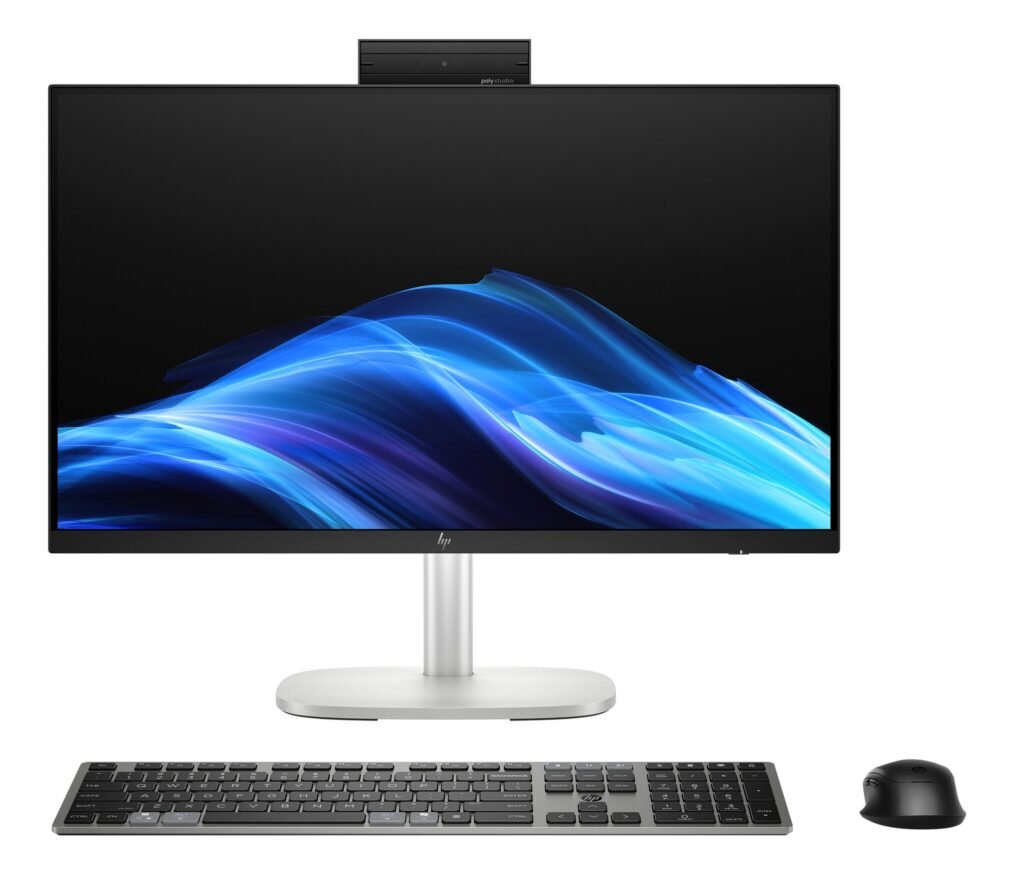
For professionals looking to streamline their workspace without sacrificing power, the HP EliteStudio 8 All-in-One G1i presents a compelling solution. This product targets users who require a robust desktop computer that combines advanced technology with a sleek design, particularly in environments where space is at a premium. The EliteStudio 8 AiO G1i features a 23.8-inch Full HD display, making it suitable for tasks ranging from graphic design to video conferencing.
Equipped with an Intel Core Ultra 5 processor and 16 GB of DDR5 RAM, the EliteStudio 8 is positioned as a mid to high-end all-in-one computer. This device not only meets the demands of everyday computing tasks but is also tailored for more intensive workloads, thanks to its AI-enhanced performance capabilities. The integration of a neural processing unit (NPU) further improves its potential for tasks requiring machine learning and advanced data processing.
In this review, we will explore the specifications of the HP EliteStudio 8, examining its performance, display quality, connectivity options, and overall suitability for various user scenarios. We will also address its limitations to provide a balanced perspective for potential buyers considering this investment.
Pros
- High-performance Intel Core Ultra 5 processor for demanding tasks.
- 16 GB DDR5 RAM allows efficient multitasking.
- 23.8-inch Full HD IPS display with anti-glare and Low Blue Light technology.
- Versatile connectivity options including Thunderbolt 4 and Wi-Fi 7.
- Sustainably designed with recycled materials.
Cons
- Limited display brightness may hinder visibility in bright environments.
- Integrated graphics may not suffice for high-end gaming or graphic design.
- 512 GB SSD may be insufficient for users with extensive storage needs.
- Higher carbon footprint compared to some competitors.
In Depth
Performance and Processing Power
The HP EliteStudio 8 is powered by the Intel Core Ultra 5 235 processor, which features 14 cores and 14 threads. This configuration allows the processor to handle multiple tasks simultaneously, making it particularly effective for professionals who multitask or run demanding applications. With a boost frequency of up to 5.0 GHz, users can expect swift performance during intensive processes, such as video editing or 3D rendering.
In practical terms, this level of performance translates into smoother operation and reduced lag when running complex software. Whether you’re compiling code, creating graphics, or managing large datasets, the EliteStudio 8’s processing capabilities ensure that tasks are completed efficiently, which is essential in a fast-paced work environment.
Display Quality and User Experience
The 23.8-inch Full HD (1920 x 1080 pixels) IPS display offers a resolution that is adequate for most professional tasks, providing clear and vibrant visuals. The anti-glare feature and Low Blue Light technology enhance the user experience by reducing eye strain during extended use, which is beneficial for professionals who spend long hours in front of their screens.
However, the display brightness of 250 nits may be a limitation in brightly lit environments, where reflections could hinder visibility. While the color coverage at 72% NTSC is decent, those in graphic design or photography may find it insufficient for color-critical work, where higher color accuracy is paramount.
Memory and Storage Options
Equipped with 16 GB of DDR5 RAM, the EliteStudio 8 supports efficient multitasking and quick access to frequently used applications. The memory clock speed of 5600 MT/s ensures that data transfer rates are high, which is crucial for performance in data-intensive tasks. Additionally, the single 512 GB PCIe NVMe M.2 SSD provides ample storage space with rapid read and write speeds, significantly improving boot times and application loading.
While the storage options are suitable for most users, those requiring extensive data storage may find the 512 GB limit restrictive. The device supports up to 4 TB of storage, which can be a point of consideration for users who anticipate needing additional space in the future.
Connectivity and Versatility
The HP EliteStudio 8 features a range of connectivity options, including multiple USB ports (both Type-A and Type-C), HDMI, and Thunderbolt 4 support. This variety allows users to connect a wide array of peripherals, from external displays to high-speed storage devices, enhancing the overall versatility of the workstation.
Moreover, the inclusion of Wi-Fi 7 (802.11be) ensures that users have access to the latest wireless technology, providing faster internet speeds and improved connectivity in busy environments. However, the reliance on wireless connectivity could pose challenges in areas with unstable internet, where a wired connection might be more reliable.
Limitations and Running Costs
Despite its robust feature set, the HP EliteStudio 8 does have some limitations. The absence of a dedicated graphics card means that users engaging in high-end gaming or graphics-intensive applications may experience performance bottlenecks. The integrated Intel Graphics is sufficient for general use but may not meet the needs of professionals requiring advanced graphic capabilities.
Additionally, the total carbon footprint of 318.59 kg of CO2e may be a concern for environmentally conscious buyers. The product’s sustainability features, including the use of recycled materials, do address some environmental considerations, but potential buyers should weigh this against their own values and environmental impact.
Who It’s For
Professionals needing a powerful desktop for multitasking and data processing.
Small business owners looking for an integrated solution with aesthetic appeal.
Remote workers who require a reliable device for video conferencing and productivity.
Use Cases
Graphic Design Work
A graphic designer requires a reliable workstation for creating graphics and managing client projects. The EliteStudio 8’s performance and display quality can support design software, although color accuracy might be a concern.
Video Conferencing Setup
For remote workers, the EliteStudio 8 offers a built-in camera and microphone, making it an ideal choice for video conferencing. Its sleek design ensures it fits well in a professional setting.
Data Analysis Tasks
Data analysts will benefit from the powerful processing capabilities of the EliteStudio 8, enabling them to run complex analyses efficiently. The fast storage also aids in managing large datasets.
Also consider

How We Researched This
This review is based on the specifications provided by the manufacturer and retailer data. We examined the processing power, memory, display quality, and connectivity options to understand how they would perform in real-world scenarios. The evaluation also considers the product’s sustainability features and overall design, comparing it with similar all-in-one desktops available in the market.
Frequently Asked Questions
What operating system is installed?
The HP EliteStudio 8 comes with Windows 11 Pro pre-installed, providing a modern and secure operating environment.
Does it support external displays?
Yes, the EliteStudio 8 includes an HDMI port and Thunderbolt 4 support, allowing connection to external monitors and devices.
What is the warranty period?
Warranty details may vary, so it is advisable to check with the retailer or manufacturer for specific warranty terms.
Our Verdict
The HP EliteStudio 8 All-in-One G1i is a solid choice for professionals requiring a powerful and stylish desktop solution. Its performance and connectivity options cater well to various use cases, but potential buyers should consider the limitations regarding graphics capabilities and storage.
Where to buy
Best for: Professionals needing a powerful desktop for multitasking and data processing.
We earn a commission if you buy through these links, at no extra cost to you. How we make money

