

Product Description
- Incredible 25GbE ConnectivityMany bandwidth-intensive workflows — including post-production shared storage workgroups — have reached a point where 10Gb Ethernet does not provide sufficient bandwidth and speed for optimum performance.
- Upgrading to 25Gb Ethernet is the smart choice — it offers greater performance and works with the same optical network infrastructure as 10GbE.
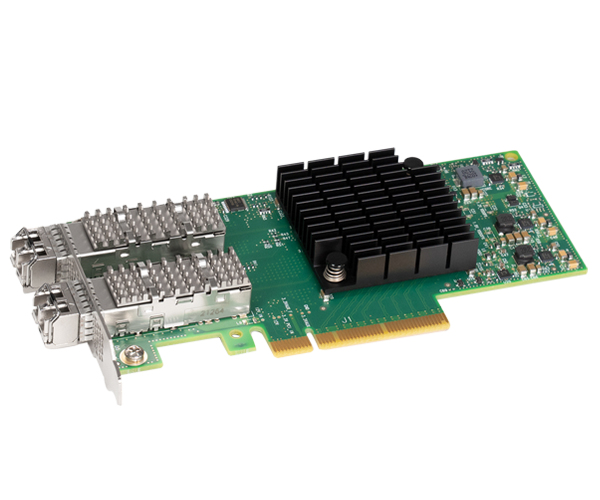
- Step up to the Sonnet Twin25G™ PCIe Card. an affordable and powerful solution for adding incredibly-fast fiber optic 25GbE network connectivity.
- Affordable 25GbE Networking
- Make the SwitchMac users need faster network speeds and increased bandwidth for postproduction workflows.
- Recently. 25Gb Ethernet switches have become more affordable. but connecting a 2019 Mac Pro® to a 25GbE infrastructure has been expensive.
- Sonnet's Twin25G PCIe Card is a cost-effective and simple solution for adding 25GbE network connectivity to not only Mac Pro. but also to any computer with PCIe slots.
- Perfect Companion for Echo Thunderbolt Expansion SystemsUse a free slot in a Sonnet multi-slot Echo Thunderbolt expansion system to add 25Gb Ethernet to your computer without card slots.
- Storage Environments
- Efficient NVMe Storage AccessStorage Environments NVMe storage devices are gaining popularity by offering very fast storage access.
- Sonnet Twin25G offers performance enhancements not only by delivering higher network speed. but also by providing NVMe over Fabric (NVMe-oF) target offloads. enabling very efficient NVMe storage access with no CPU intervention. thus improving performance and reducing latency.
- Compared to multi-fabric teamed 10G networks. a consolidated 25G storage network achieves significant cost and performance advantages with fewer cables and switch ports. which also lowers power requirements.
- Includes Two Mounting Brackets
- Install Card Into Any PCIe SlotTwin25G PCIe Card is packaged with both full-height and low-profile mounting brackets. enabling installation of the card into any PCIe slot.
- Install and Connect
- Simple InstallationSimply install the Twin25G PCIe Card into a PCIe slot in your computer or Sonnet Thunderbolt PCIe card expansion system. install a driver. install the included SFP28 modules. and then connect the card to the network switch or directly to 25GbE-enabled storage.
- Configure the adapter’s settings through the macOS Network control panel.
- Windows Device Manager. or Linux command line (or graphical utility).
Specifications
| Brand Id | 15170 |
|---|---|
| Specifications | Sonnet Twin25G Internal Fiber 25000 Mbit/s |
| Language | en_GB |
| Delivery Time | Standard delivery in 3 working days |
| Delivery Cost | £0.00 |
| Warranty | 1 year |
| Condition | new |
| Keywords | Sonnet Twin25G Internal Fiber 25000 Mbit/s |
Affiliate Disclosure: We may earn a commission when you purchase through our links, at no extra cost to you. This helps support our independent reviews. Learn more