

Product Description
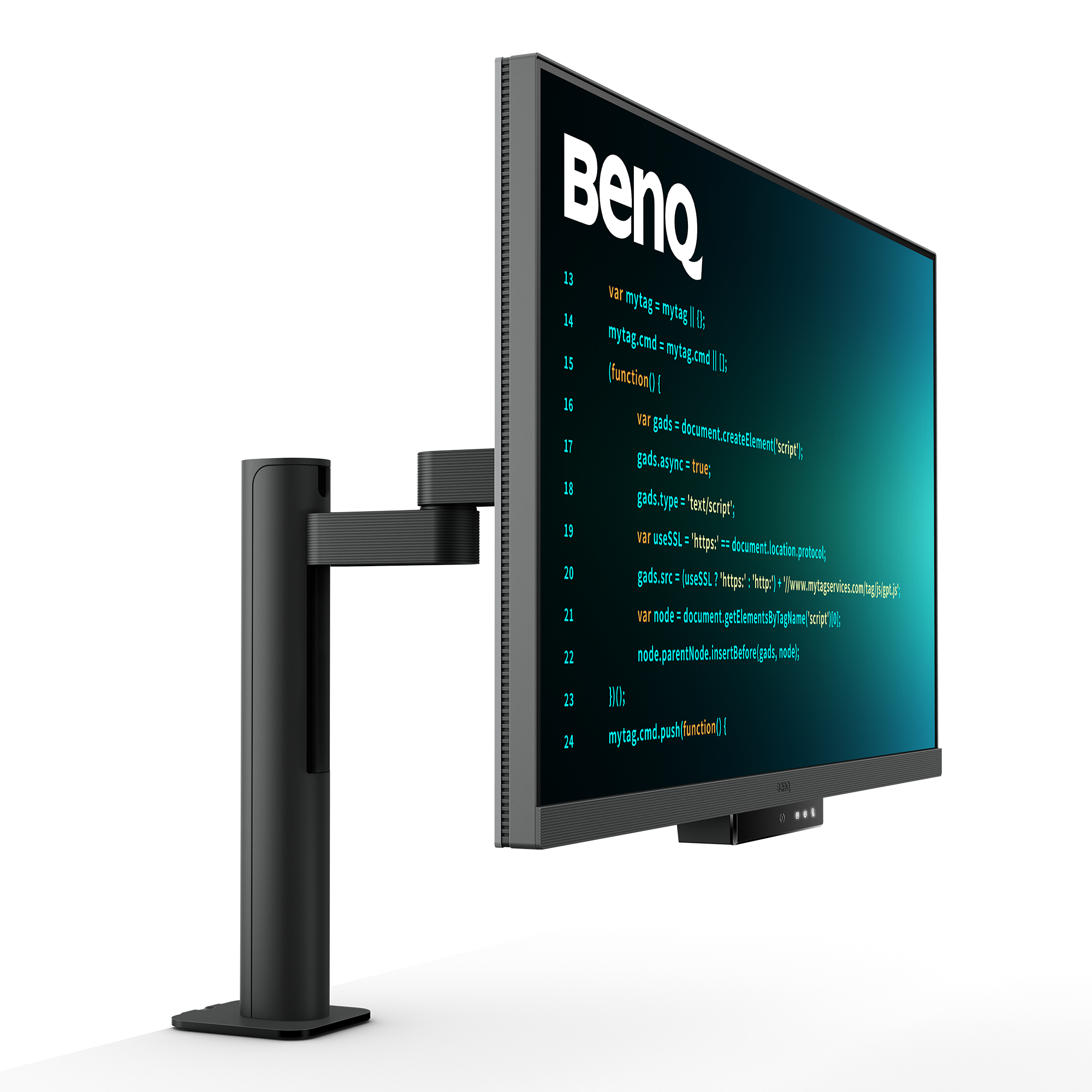
- RD320UA|32” 4K BenQ Programming Monitor with MoonHalo and Flexible ArmAstonishing Clarity for the Ultimate Coding ExperienceDisplay Clarity Powers ProgrammingIlluminate your logic and ship code with perfect focus.
- Absorb Your Code AnywhereCrafted for Programmers:BenQ Programming Monitor lets you fully absorb your code. wherever you are.
- Enter the Coding Flow in SecondsEnter the coding flow in seconds with BenQ Nano Matte Panel.
- Featuring a low reflection property to minimize distractions. this advanced technology enhances focus and boosts productivity. delivering unparalleled clarity for peak performance.
- Elevate your coding experience and unlock your full potential with BenQ.2000:1 Contrast Ratio for Clearer Code and Stunning VisualsExperience unparalleled clarity with a 2000:1 contrast ratio.
- Enjoy deeper blacks and high contrast with a premium 4K display for coding. movies. and gaming. ensuring exceptional visual performance.
- This enhancement not only improves image quality but also increases overall immersion. providing a more engaging and captivating experience.
- Ignite Night Coding InspirationWhether you prefer working in a soft. ambient glow. complete darkness during late-night hours. or complete darkness during late-night work. we've got you covered for long-lasting eye care.
- Effortless Comfort with Night Hours ProtectionBenefit from minimum brightness technology for reduced eye strain. discover enhanced eye protection during night hours and dark room usage with our Night Hours Protection.
- Its intelligent ambient light detection and auto-switch capabilities require minimal user intervention. ensuring effortless and consistent eye care.
- Experience Focus Anytime with MoonHaloExperience MoonHalo by BenQ – a seamless blend of immersive illumination and comforting ambiance.
- With customizable color temperature. brightness. and light modes. along with Auto Dimming powered by B.
- I.
- Gen2.
- MoonHalo ensures optimal eye protection and focus. anytime whether you're working from home or the office.
- Designed for Coding ExcellenceExclusive Coding Modes Boost ProductivityBenQ's advanced coding modes deliver clear fonts and better code differentiation. reducing eye strain.
- Choose from dark and light themes and easily adjust brightness. sharpness. and contrast for optimal coding.
- Instant Coding with Hotkey and Function BarEffortlessly boost productivity with our unique Coding HotKey and Function Bar designs.
- With a swift press of the Coding HotKey at the heart of the function bar. immerse yourself instantly into the coding realm.
- Infinite Desk Flexibility for ProgrammersBenQ Ergo Arm enhances flexibility and provides the optimal screen position for a more comfortable and productive user experience.
- Optimal Posture.
- Superior OutputRelieve prolonged neck and body aches.
- BenQ Programming Monitors prioritize your comfort for long-term projects and support pivot and VESA mounting.
- Ergo Arm Stand : Elevating Coders' Desks with Infinite FlexibilityBenQ Ergo Arm enhances flexibility and provides the optimal screen position for a more comfortable and productive user experience.
- Quick Connectivity with Easy Plug and PlayBenQ Programming Monitor offers ample port options. including USB Type-C for all-in-one connectivity. meeting your multitasking needs.
- Unified Integration with KVM SwitchingMaximum efficiency through unified integration with diverse devices and built-in KVM (keyboard. video. mouse) for seamless source switching.
- Daisy Chain with the 90W USB Type-CMulti-Stream Transport Technology allows you to extend screens across multiple displays using the USB Type-C.
- The 90W USB Type-C carries images. videos. and other data seamlessly and charges your mobile devices simultaneously with one cable.
- Please note that Mac® and MacBook® devices only support daisy chaining via Thunderbolt.
- Daisy chaining is not supported via HDMI or using regular USB ports on any device.
- Also. you can only connect a single external display using a Mac device with the M1 or M2 chips.
- For more information about connecting different models of Mac devices to external displays. please refer to the Apple website.
- Effortless Multi-Device Display with PIP/PBP and DualView PlusDualView Plus simplifies multi-device displays by letting you customize color modes across applications or windows.
- With support for PIP and PBP. you can easily manage dual-source or single-source viewing.
- Optimize Productivity with PIP and PBPPIP (Picture-in-Picture) and PBP (Picture-by-Picture) efficiently optimize screen space.
- PIP overlays a secondary window for multitasking. while PBP splits the screen to display content from multiple sources. boosting productivity.
- DualView Plus Displays Versatile Color ModesDualView Plus with PIP/PBP not only displays dual sources simultaneously but also allows different color modes for each screen.
- Set Displays with Mouse and Keyboard via Display Pilot 2Display Pilot 2 caters to your needs. allowing easy arrangement of functions like MoonHalo
Specifications
| Brand Id | 1814 |
|---|---|
| Specifications | BenQ RD320UA computer monitor 80 cm (31.5") 3840 x 2160 pixels 4K Ultra HD LED Black |
| Language | en_GB |
| Delivery Time | Standard delivery in 3 working days |
| Delivery Cost | £0.00 |
| Warranty | 1 year |
| Condition | new |
| Keywords | BenQ RD320UA computer monitor 80 cm (31.5") 3840 x 2160 pixels 4K Ultra HD LED Black |

Affiliate Disclosure: We may earn a commission when you purchase through our links, at no extra cost to you. This helps support our independent reviews. Learn more