

Featured in Review
Why We Recommend This
Top Pick
In a world where mobile productivity is increasingly essential, the need for a reliable and durable keyboard cannot be overstated. Professionals working in field conditions or on-the-go often face challenges…
Read Full Review: Panasonic FZ-VEKG21LN Mobile Device Keyboard: A Rugged Companion for Demanding Environments →Product Description
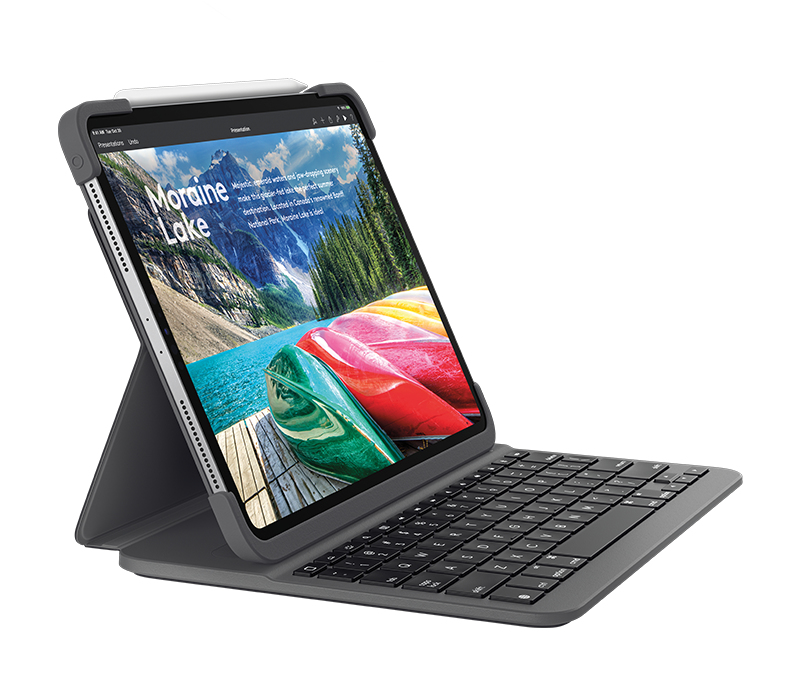
- PRO BEYONDSlim Combo pairs with iPad Pro for the ultimate Pro experience.
- Four distinct modes give you unparalleled versatility. and Smart Connector pairs and powers your keyboard in one magical instant.
- FOUR VERSATILE MODESA protective cover and detachable keyboard supports 4 use modes
- Typing.
- Viewing.
- FaceTime.
- Reading - giving you amazing versatility.
- ALL PRO.
- ALL DAY.
- ALL NIGHT.
- Full-size backlit keys. smart iOS shortcuts and the most laptop-like typing experience on iPad Pro.
- CONNECT LIKE A PROBatteries aren’t included. because you’ll never need them.
- Place your iPad Pro into Smart Connector and your keyboard instantly pairs and powers on.
- PRO STYLED PERFECTION360 degrees of protection in an impossibly slim keyboard and case combo for 12.9 inch and 10.5 inch iPad Pro.
- IPAD PRO CONTROLS AT YOUR FINGERTIPSA full row of iOS shortcuts puts the power of iPad Pro at your fingertips: 1
- Home: Go to home screen2
- Screen brightness: adjust screen brightness up or down3
- Search: bring up iOS search field4
- Language: switch keyboard input language5
- Backlighting: adjust brightness of keyboard backlighting6
- Media controls: Back.
- Play/Pause.
- Forward7
- Volume controls: Mute.
- Volume up.
- Volume down8
- Screen on/off - locks iPad Pro screen.
- LEAVE THE KEYBOARD BEHIND Whenever you don’t need typing. detach the keyboard and enjoy your beautiful iPad Pro screen with nothing standing in the way.
- ALL THE RIGHT ANGLESThere’s a right angle for every situation – and it’s not always 90 degrees.
- Two micro hinges ensure that Slim Combo smoothly reclines within 50 degrees range and stays in place once you’ve got that perfect setting.
- HANDS-FREE HELLOWhen a call comes in. simply switch Slim Combo into portrait mode for a hands-free FaceTime experience that captures less background and more of what matters.
- CREATE.
- READ.
- AND BROWSEGo for a minimalist hand-held mode to sketch out an idea or just sit back and get lost in an article or e-book without distractions.
- ADDITIONAL
- A HOME FOR APPLE PENCILApple Pencil brings a whole new creative experience to your iPad Pro. and Slim Combo’s Apple Pencil holder makes sure it’s always by your side.
- Slide your Apple Pencil into the holder– where it won’t get lost. or in the way.
- LAPTOP-LIKE TYPINGPunch out emails – or an entire novel – on a full-size keyboard with carefully-crafted well-spaced concave keys. 3 levels of adjustable backlighting keep you productive in low light.
- PAIR IN AN INSTANT VIA SMART CONNECTORSlim Combo connects to iPad Pro via physical connector. meaning you will never have to pair your keyboard again.
- Just click in and type away.
- When you are done. detach the keyboard to disconnect.
- FORGET ABOUT CHARGING.
- FOREVER Slim Combo has been designed specifically for the 12.9 inch and 10.5 inch iPad Pro.
- The keyboard has no charging cable. batteries. or blinking indicator light – getting all of its power directly from iPad Pro.
- It uses minimum power – 0.3%-2.3% of iPad Pro battery for every hour of typing.
- Plus. any iOS updates are communicated directly to your keyboard via Smart Connector.
Specifications
| Brand Id | 9722 |
|---|---|
| Specifications | Logitech SLIM COMBO with detachable keyboard and Smart Connector for iPad Air (3rd gen) and iPad Pro 10.5-inch QWERTY Italian Black |
| Language | en_GB |
| Delivery Time | Standard delivery in 3 working days |
| Delivery Cost | £0.00 |
| Warranty | 1 year |
| Keywords | Logitech SLIM COMBO with detachable keyboard and Smart Connector for iPad Air (3rd gen) and iPad Pro 10.5-inch QWERTY Italian Black |
Affiliate Disclosure: We may earn a commission when you purchase through our links, at no extra cost to you. This helps support our independent reviews. Learn more