

Product Description
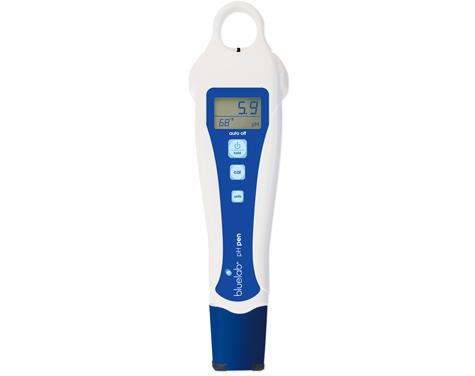
- Bluelab pH Pen The ultimate handy solution for measuring pH and temperature!Plants get their nutrient from minerals but they can only get all the right minerals they need if certain conditions are right.
- Think of nutrients like a lock. pH is the key.
- A key factor that affects food uptake is whether your solution is acid or alkaline.
- We measure this in pH.
- The Bluelab pH Pen also measures the temperature of the solution, as root health is vital to the success of a crop.
- Temperature affects the growth rate and structure of a plant so a solution temperature of 18-22C or 65-72F is recommended.
- The hand held pH pen provides a compact quick and handy way to manage the success of your crop to ensure maximum uptake of nutrients.
- Measures pH and temperature Selectable units for temperature Backlit LCD display Double junction probe (not replaceable) Successful pH calibration indicator Hold reading function Low battery indicator Fully waterproof Auto off function Automatic temperature compensation How To Use For 24 hours, soak in KCL solution before use Before use, calibrate Press the power button to turn on Press and hold the power button to turn off Measure pH by removing the cap.
- Hold in the solution and wait until it stabilises. Press the power button to hold the reading.
- To cancel the hold, press the power button once more To change temperature units, hold the button down for three seconds and then press the button.
- Rinse the probe and then add 3 to 5 drops of KCL solution to your cap.
- Then, replace the cap and store it for future use.
- To calibrate Rinse and then place in pH 7 solution Wait for the readings to stabilise Hold the cal button down.
- Hold the cal button down, but keep the probe in solution.
- The display will flash while you release the button.
- After the pH reading is displayed, rinse the water with fresh water and then place the solution in a pH4/PH10 solution.
- Wait for the reading to stabilise.
- Hold the cal button down.
- Hold the cal button down, but keep the probe in solution.
- The display will flash while you release the button.
- Cal 4 and Cal 10 should be displayed, the tick should also be displayed
Specifications
Affiliate Disclosure: We may earn a commission when you purchase through our links, at no extra cost to you. This helps support our independent reviews. Learn more