

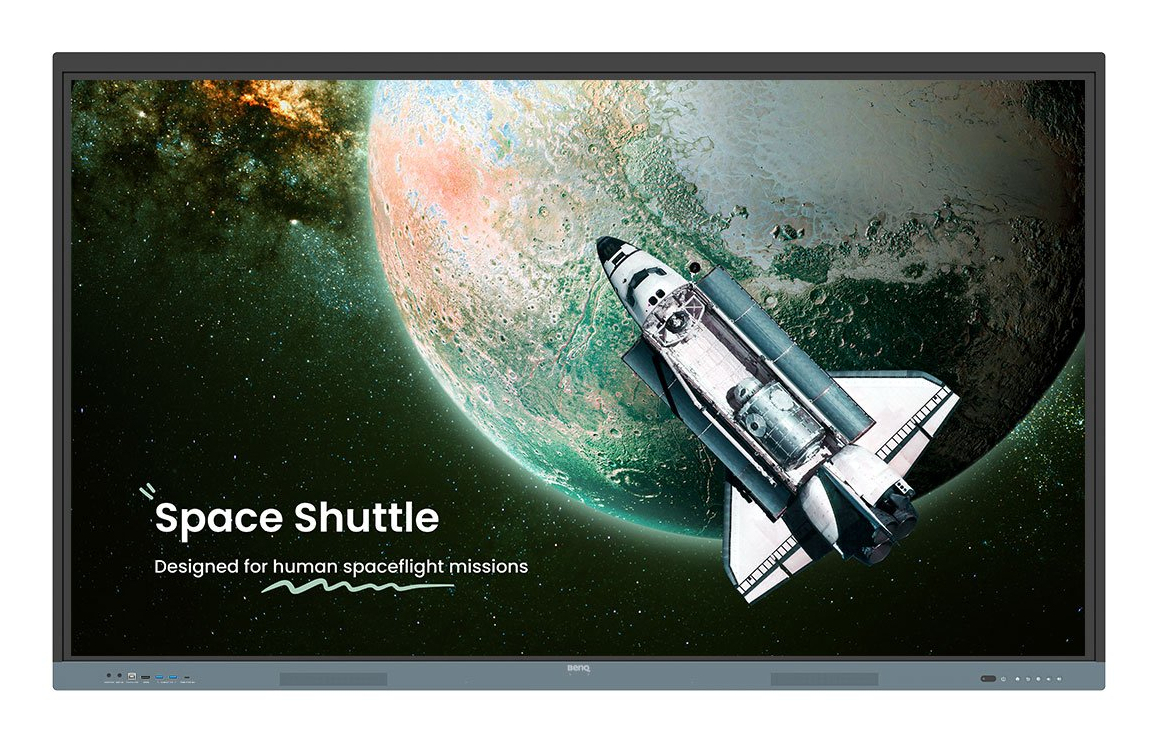
Product Description
- BenQ Board Essential The essence of education Have all the essential tools you need for effective interactive lessons.
- Harness the power of GoogleThe EDLA-certified BenQ Board combines Google services with ever-reliable BenQ hardware and software.
- Expansive app libraryInstall education apps directly from Google Play for more interactive lessons.
- Go-to Google servicesAccess essential Google Core Services such as Google Drive and Meet.
- Google Docs editorsQuickly open lesson files with any Google app on a large touchscreen display.
- Direct file accessGoogle Drive integration lets you access and save files to your cloud storage directly from the board.
- Built-in data securityKeep your boards safe against security and privacy threats with Google Play Protect and Safe Browsing.
- A whiteboard like no otherDo more than just write or draw.
- EZWrite’s expandable canvas offers limitless possibilities with its rich collection of lesson tools and helpful AI
- .
- Use your own filesImport a variety of lesson files. interact with its contents on the whiteboard. and then export the session as an editable file for a future class.
- A tool for every needPull up any of EZWrite’s built-in tools that are designed to engage students. and meet a wide variety of lesson activities and subjects.
- Take lessons to the cloudExtend the whiteboard so that others can participate and interact with the board whether they’re joining from their seats or from home.
- Built-in AI tools for more inclusive lessonsText-to-speechHave displayed text read aloudMultilingual translationTranslate text with a tapOCREdit text from imported imagesEssential tools for every teacherThe RE04 uncomplicates your teaching experience by giving you everything you need on one board.
- Your own space and dataAll accounts are secure and separate—allowing you to have your own teaching space while preventing others from accessing your data.
- Organise with easeSave time by having all your most-used apps. files. and widgets arranged and accessible directly from your home screen.
- Snap.
- Record.
- Write.
- The Floating Tool lets you take snapshots. record your screen. and annotate over any app. file. webpage. or video displayed on the board.
- Sidebar accessExpand the sidebar for convenient access to recent apps. files. and input sources. as well as a shortcut to the home screen.*Available in Q2.
- Expanded searchUse BenQ Search to quickly query related content from the internet or sort through your lessons files stored on the board or your cloud.
- Enhance your lesson flowIncrease teaching efficiency with the multi-window mode. allowing you to whiteboard while using other apps on the side. *Available in Q3.5-in-1 connectivityThe multipurpose USB-C port allows for quick data transmission. clear audio/video playback. touchback controls. and 65-watt charging.
- Full vibrant audioExperience enhanced audio with the board’s built-in 20-watt speakers that offer crisp. room-filling sound.
- All hands on boardThe BenQ Board Essential’s large interactive screen is designed for whole-class participation. letting you boost engagement and liven up your lessons.40 touch pointsGet everyone actively participating in class with the RE04’s 40 touch points.
- Gap-free writingNo gaps and an 8ms response time ensure a natural writing experience every time.
- Precise touchYou’re guaranteed smooth interactions with the board’s Precision IR technology.
- Everyone can shareInstaShare 2 lets everyone share ideas freely.
- Wirelessly cast lesson content and interact with any device from anywhere in the room.
- Beyond screen sharingDo more than just cast your screen.
- Media sharing makes lessons more dynamic.
- Share photos. videos. or even a live camera feed from your device directly to the board.
- Moderate sessions with easeHost controls allow you to effectively manage your sessions.
- Accept or reject sharing requests and show or hide screens. while the AI Guardian automatically blocks nude content.
- Management made easyBenQ takes out the complexity from device and user list management. significantly reducing IT workload so they can focus on other tasks.
- Effortless user list syncingSimplify identity management by syncing any of your existing Google Workspace.
- Entra ID (formerly Azure Active Directory).
- ClassLink.
- LDAP. or SAML-based user lists.
- Centralised managementRemotely manage all your BenQ devices on an all-in-one console that lets you install. update. and delete apps. push firmware updates. and automate tasks such as startup and shutdown.
- Enhanced data securitySafeguard your data through the RE04’s secure login options and access controls. regular system updates. and built-in Google Play Protect and Safe Browsing measures.
- Data-driven efficiencyGenerate specific and comprehensive device analytics so you can monitor how your boards are being utilised and adjust usage guidelines to maximise efficiency.
- School-wide announcementsWith X-Sign Broadcast. you can send out timely announcements to all your BenQ displays.
- Inform your school about upcoming events. importa
Specifications
| Brand Id | 1814 |
|---|---|
| Specifications | BenQ RE7504 Interactive flat panel 190.5 cm (75") 450 cd/m² 4K Ultra HD Black. Grey Touchscreen Built-in processor Android |
| Language | en |
| Delivery Time | Standard delivery in 3 working days |
| Delivery Cost | £0.00 |
| Warranty | 1 year |
| Keywords | BenQ RE7504 Interactive flat panel 190.5 cm (75") 450 cd/m² 4K Ultra HD Black. Grey Touchscreen Built-in processor Android |
Affiliate Disclosure: We may earn a commission when you purchase through our links, at no extra cost to you. This helps support our independent reviews. Learn more