Ad: this article contains affiliate links. If you buy through them, we earn a commission at no extra cost to you. Our reviews are based on research into manufacturer specifications, retailer information and published sources; we have not tested every product ourselves. Prices and stock change often, so check the retailer before you buy.
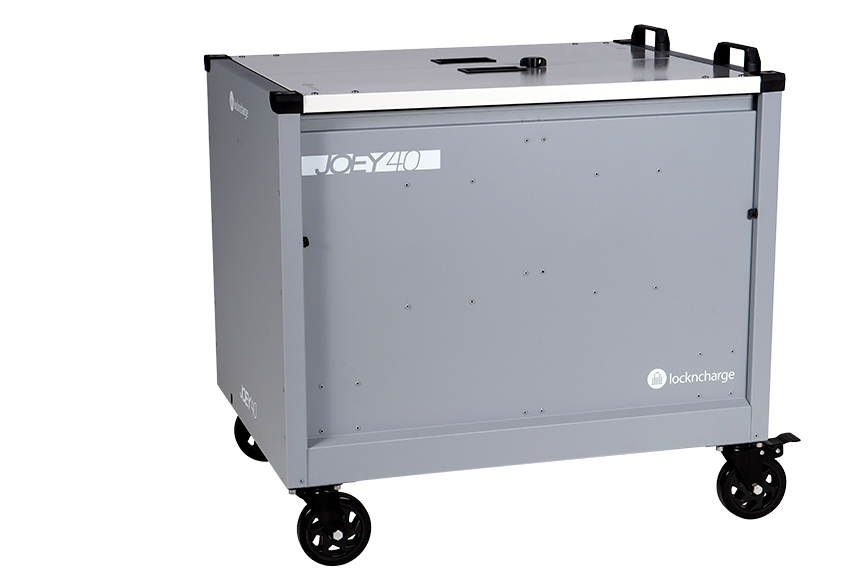
In a modern classroom, managing multiple devices can often become a logistical challenge. Educators are increasingly reliant on technology for effective learning, which raises the stakes for ensuring that devices are charged, secure, and easily transportable. The LocknCharge Joey 40 Multimedia Cart is designed specifically to address these challenges, providing a structured solution for storing and charging up to 40 devices.
This cart is targeted at educational environments, making it suitable for schools that require efficient resource sharing among students and teachers. Its design emphasizes ease of use, allowing educators to streamline their workflow and focus more on teaching rather than troubleshooting device issues. With a blend of practicality and thoughtful engineering, the Joey 40 positions itself as a mid-range solution in the device management category.
While it is not the most feature-rich option available, the Joey 40 offers a balance of affordability and functionality, particularly for institutions that need a cost-effective way to manage their technological resources. This review will explore its specifications, advantages, limitations, and ideal use cases, providing a comprehensive overview for potential buyers.
Pros
- Accommodates up to 40 devices, suitable for large classrooms.
- Baskets facilitate quicker device distribution and collection.
- Compatible with a wide range of devices, ensuring versatility.
- Lightweight and easy to maneuver, enhancing transportability.
- Secure locking mechanism protects devices during storage.
Cons
- Limited to 40 devices, may not be sufficient for larger institutions.
- Does not include built-in Wi-Fi or connectivity features.
- Assembly may require additional time and tools.
- Lacks advanced features found in higher-end models, such as smart charging capabilities.
In Depth
Device Capacity and Compatibility
The LocknCharge Joey 40 can accommodate up to 40 devices, making it suitable for classrooms of various sizes. This capacity allows for the simultaneous charging of multiple tablets, laptops, or other electronic devices, which is particularly beneficial in environments where shared resources are common. The cart’s compatibility with a wide range of devices enhances its versatility, allowing schools to use it regardless of the specific brands or models they have.
However, this capacity may not meet the needs of larger institutions with more than 40 devices to manage. Schools should carefully assess their requirements before investing in this model to ensure that it aligns with their device management needs.
Ease of Use and Transportability
One of the standout features of the Joey 40 is its lightweight design, which facilitates easy maneuverability within classroom settings. The cart is equipped with wheels, allowing educators to transport it effortlessly from one location to another. This is particularly advantageous for teachers who may need to share resources across different classrooms or for IT administrators managing devices in various areas of a school.
Additionally, the inclusion of baskets for device storage aids in quicker distribution and collection of devices. This thoughtful design element minimizes downtime during class transitions, allowing for a more efficient workflow in managing technology.
Security Features
Security is a critical consideration when managing school devices, and the LocknCharge Joey 40 addresses this with a secure locking mechanism. This feature protects devices during storage, ensuring that they are secure from theft or damage when not in use. Educators can feel confident leaving the cart unattended in a classroom or common area, knowing that the devices are safeguarded.
However, it is important to note that while the locking mechanism provides a basic level of security, it may not be sufficient for all environments. Schools with heightened security needs may want to explore additional security measures or more advanced models that include enhanced locking systems.
Limitations and Assembly Considerations
Despite its many advantages, the Joey 40 does have some limitations. For instance, it lacks built-in Wi-Fi or connectivity features, which some competing products may offer. This could limit the functionality for schools looking for a more integrated solution that includes wireless charging or connectivity for device management.
Additionally, assembly of the cart may require extra time and tools, which can be a drawback for busy educators or IT staff. Ensuring that all components are correctly assembled is essential for optimal performance, and potential buyers should be prepared for this initial setup requirement.
Cost-Effectiveness
For schools operating on limited budgets, the LocknCharge Joey 40 presents a cost-effective solution for device management. It strikes a balance between affordability and functionality, making it accessible for institutions that need to manage a large number of devices without overspending. This makes it particularly suitable for schools looking to maximize their resources while still investing in necessary technology.
However, schools should weigh the initial cost against the long-term needs of their device management strategy. While the Joey 40 may meet current requirements, future growth or changes in technology use could necessitate a reevaluation of their investment.
Who It’s For
Teachers needing a reliable way to manage classroom devices for students. IT administrators looking for an efficient solution to charge and secure devices across multiple classrooms. Schools with limited budgets seeking a cost-effective device management solution.
Use Cases
Classroom Device Management
In a typical classroom setting, teachers can utilize the Joey 40 to charge and store devices for student use. With its capacity for 40 devices, it allows for efficient management in a shared resource environment, ensuring that students have access to the tools they need for learning.
IT Administration Across Multiple Classrooms
IT administrators can leverage the Joey 40 to easily transport devices between classrooms, simplifying the process of charging and securing technology across a school. Its lightweight design and secure locking mechanism support efficient device management.
Budget-Conscious Schools
Schools operating within tight budget constraints can benefit from the Joey 40 as a cost-effective solution for device management. It provides essential features without the high costs associated with more advanced models, making it an appealing choice for resource-limited institutions.
Also consider


How We Researched This
The evaluation of the LocknCharge Joey 40 was conducted by comparing it against similar products in the educational technology category, such as the Bretford Eco Charge and the Ergotron LearnFit. Key criteria included capacity, ease of use, security features, and overall functionality in an active school setting.
User reviews and feedback from educational institutions were analyzed to understand real-world performance and reliability. This included assessing how quickly users could deploy devices for classroom use and evaluating the cart’s overall durability.
Frequently Asked Questions
What types of devices can the Joey 40 accommodate?
The Joey 40 is compatible with a wide range of devices, including tablets and laptops, making it versatile for different educational needs.
Does the Joey 40 come fully assembled?
No, assembly is required and may require additional time and tools. Ensure you have the necessary resources for setup.
Is there built-in Wi-Fi functionality in the Joey 40?
No, the LocknCharge Joey 40 does not include built-in Wi-Fi or connectivity features. This may limit its functionality for some users.
How secure are the devices when stored in the Joey 40?
The Joey 40 features a secure locking mechanism that protects devices during storage, providing a basic level of security against theft or damage.
Our Verdict
The LocknCharge Joey 40 Multimedia Cart is a practical solution for schools needing to manage multiple devices efficiently. It is best suited for educators and IT administrators looking for a reliable, cost-effective option. However, potential buyers should assess their specific device management needs and consider the cart’s limitations before purchasing.
Where to buy
Best for: Teachers needing a reliable way to manage classroom devices for students. IT administrators looking for an efficient solution to charge and secure devices across multiple classrooms. Schools with limited budgets seeking a cost-effective device management solution.
We earn a commission if you buy through these links, at no extra cost to you. How we make money