Ad: this article contains affiliate links. If you buy through them, we earn a commission at no extra cost to you. Our reviews are based on research into manufacturer specifications, retailer information and published sources; we have not tested every product ourselves. Prices and stock change often, so check the retailer before you buy.
As organizations transition to hybrid work environments, effective communication tools become paramount. Video conferencing systems are essential for ensuring that remote and in-office employees can collaborate smoothly. The Lenovo ThinkSmart Core Gen 2+CTRL MTR addresses this need with a tailored solution for Microsoft Teams Rooms, aiming to enhance meeting experiences across various settings.
Positioned as a professional-grade product, the ThinkSmart Core combines robust hardware and intuitive software to facilitate smooth video conferencing. Its integration with Microsoft Teams Rooms allows for immediate deployment in compatible meeting spaces, making it suitable for IT departments and organizations looking to streamline their communication processes.
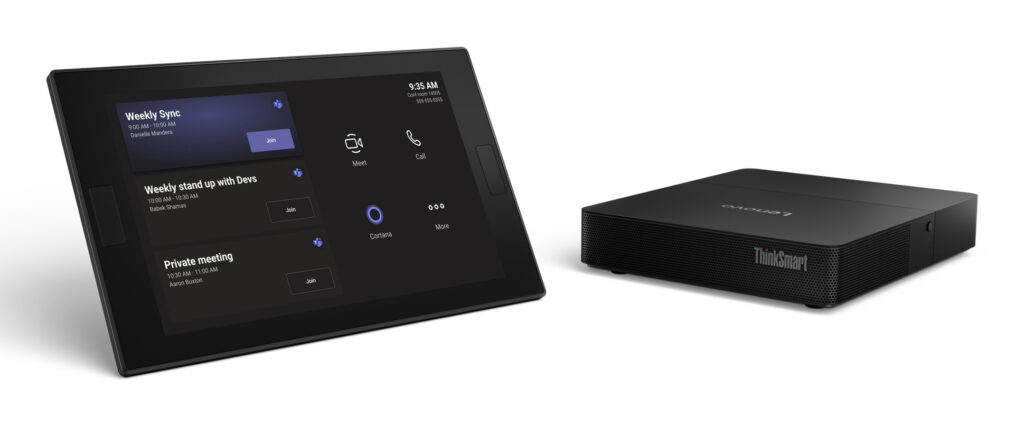
Equipped with an 11th Gen Intel Core vPro processor, this system is designed to handle demanding applications efficiently. The accompanying 10.1-inch HD touchscreen controller offers a user-friendly interface, simplifying meeting management and content sharing. This review will explore the ThinkSmart Core’s features, performance, and limitations, providing insights for potential buyers.
Pros
- 11th Gen Intel Core vPro processors provide robust performance for demanding applications.
- Preloaded with Microsoft Teams Rooms, enabling immediate use in compatible meeting spaces.
- The 10.1-inch HD touchscreen controller simplifies meeting management and content sharing.
- Integrated IR sensors automatically manage power based on room occupancy.
- ThinkSmart Manager software allows for easy remote device management and troubleshooting.
- Built-in security features, including ThinkShield and Intel vPro platform, protect sensitive information.
Cons
- The subscription model for ThinkSmart Manager may incur additional ongoing costs after the first year.
- Limited to Microsoft Teams Rooms, which may not suit organizations using other platforms.
- The installation may require existing A/V infrastructure, potentially increasing initial setup costs.
- The design may not appeal to all aesthetics, depending on the meeting room decor.
In Depth
Performance and Processing Power
The Lenovo ThinkSmart Core Gen 2 is powered by an 11th Gen Intel Core vPro processor, which is engineered for high-performance computing. This processor is particularly beneficial for businesses that rely on resource-intensive applications during meetings, such as video presentations or collaborative document editing. Users can expect quick response times and smooth multitasking, which are essential for maintaining engagement in virtual meetings.
In practical terms, this means that participants will experience fewer lags and interruptions during video calls. The vPro technology also enhances security features, making it suitable for organizations that prioritize data protection. For IT departments, the ability to manage devices remotely further streamlines operations, allowing for timely troubleshooting and updates without requiring physical access.
User-Friendly Touchscreen Controller
A significant feature of the ThinkSmart Core is its 10.1-inch HD touchscreen controller, which simplifies the user experience. This controller allows users to manage meetings effortlessly, from joining calls to sharing content with a simple tap. The intuitive interface reduces the learning curve for less tech-savvy users, making it accessible for all employees.
Moreover, the touchscreen facilitates quick adjustments during meetings, such as muting or changing camera angles, enhancing the overall meeting effectiveness. This ease of use can lead to more productive sessions, as participants spend less time troubleshooting technical issues and more time focusing on collaboration.
Smart Power Management
The ThinkSmart Core features integrated IR sensors that automatically manage power based on room occupancy. This capability is particularly advantageous in hybrid workspaces where meeting room usage can vary significantly throughout the day. By automatically turning off the system when not in use, organizations can reduce energy consumption, contributing to sustainability efforts and lowering operational costs.
This feature not only enhances convenience but also extends the lifespan of the hardware by minimizing unnecessary wear and tear. For businesses looking to optimize resource usage, the ThinkSmart Core’s smart power management is a noteworthy asset.
Limitations and Subscription Model
While the ThinkSmart Core offers robust features, potential buyers should consider the ongoing costs associated with the ThinkSmart Manager software, which operates on a subscription model. After the first year, organizations may incur additional expenses, which could impact budget planning, especially for larger teams or multiple installations.
Additionally, the system is specifically designed for Microsoft Teams Rooms, which may not suit organizations that utilize other video conferencing platforms. This limitation could restrict flexibility in choosing software solutions, necessitating a thorough evaluation of the company’s existing setup before committing to this product.
Design Considerations
The design of the ThinkSmart Core may not align with all aesthetic preferences in meeting room decor. While functionality is paramount, the appearance of technology in professional settings can influence the overall atmosphere. Organizations should consider how the system will fit into their existing environments, as a mismatch could detract from a cohesive design.
Furthermore, the installation of the ThinkSmart Core may require existing audio/visual infrastructure, which could lead to increased initial setup costs. Organizations must evaluate their current capabilities to determine if additional investments are necessary for optimal integration.
Who It’s For
IT departments seeking to implement a comprehensive video conferencing solution for Microsoft Teams.
Organizations with existing A/V technology that need a powerful computing device for enhanced collaboration.
Use Cases
Corporate Meeting Rooms
In a corporate environment with frequent meetings, the ThinkSmart Core can serve as the central hub for video conferencing, allowing teams to connect effortlessly and share presentations in real time. Its compatibility with Microsoft Teams ensures that employees can leverage existing tools for smooth communication.
Remote Team Collaboration
For remote teams that need to stay connected, the ThinkSmart Core offers a reliable solution that enhances the virtual meeting experience. This system allows for clear video and audio quality, which is crucial for effective collaboration and decision-making.
Training Sessions
Organizations conducting training sessions can benefit from the ThinkSmart Core’s capabilities, as it allows trainers to share content easily and engage participants through high-quality video. The intuitive controller makes it simple to navigate through training materials, ensuring a smooth delivery.
Also consider


How We Researched This
The evaluation of the Lenovo ThinkSmart Core Gen 2+CTRL MTR involved comparing its specifications and features against similar video conferencing systems such as the Logitech Rally and Poly Studio X. Key aspects included processor performance, usability, and security features, with a particular focus on how these elements contribute to effective collaboration in business environments.
We considered the integration with Microsoft Teams Rooms, which is a significant factor for organizations already utilizing this platform. Additionally, the presence of robust security features like ThinkShield and Intel vPro platform was critical in assessing its suitability for environments where data protection is a high priority.
Frequently Asked Questions
What platforms does the ThinkSmart Core support?
The ThinkSmart Core is specifically designed for Microsoft Teams Rooms, making it ideal for organizations that primarily use this platform.
What is included in the box?
The package typically includes the ThinkSmart Core device and the touchscreen controller, but it’s advisable to check with the retailer for specific inclusions.
Are there any additional costs after the first year?
Yes, the ThinkSmart Manager operates on a subscription model, which may incur additional costs after the first year.
Our Verdict
The Lenovo ThinkSmart Core Gen 2+CTRL MTR is well-suited for organizations heavily invested in Microsoft Teams, offering solid performance and user-friendly features. However, potential buyers should assess their existing A/V setup and consider ongoing subscription costs before making a decision.