Ad: this article contains affiliate links. If you buy through them, we earn a commission at no extra cost to you. Our reviews are based on research into manufacturer specifications, retailer information and published sources; we have not tested every product ourselves. Prices and stock change often, so check the retailer before you buy.
Picture this: you’re in the middle of an intense gaming session, adrenaline pumping, when suddenly your controller stops responding. This frustrating scenario is all too common with many gaming accessories, leading to interruptions that can cost you a game. The Microsoft JMU-00003 Gaming Controller aims to eliminate such concerns with its wired design and solid build quality.
This controller is specifically engineered for Xbox users, providing a smooth gaming experience without the latency issues often associated with wireless models. It features a 2.7-meter cable that allows for comfortable positioning, ensuring that you can set up your gaming area as you please. Additionally, the built-in lithium-ion battery is designed to keep you powered during those long sessions, so you won’t have to worry about running out of juice at a critical moment.
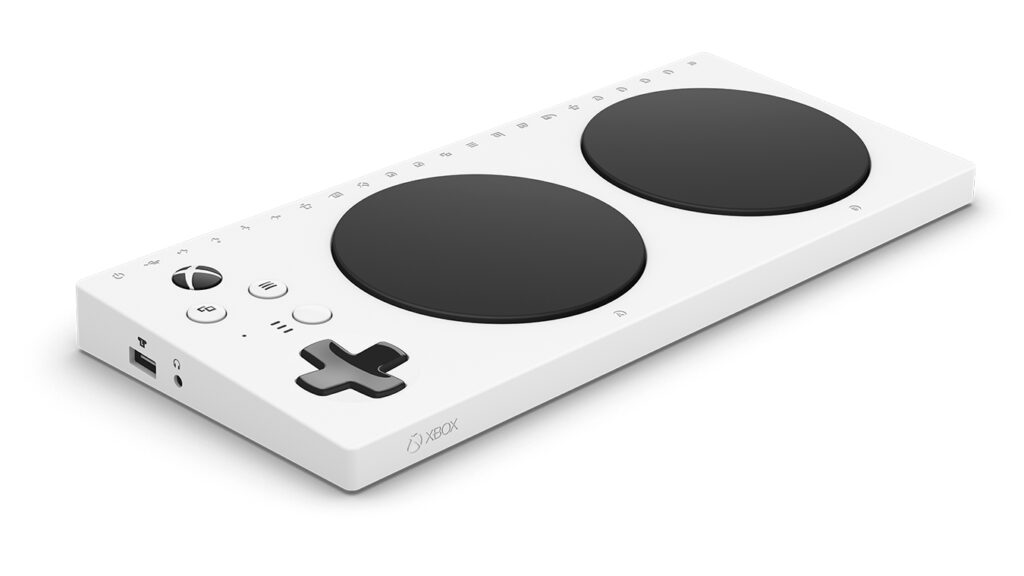
With its clean white aesthetic, the JMU-00003 not only performs well but also enhances the visual appeal of your gaming setup. Its compatibility with Windows 10 further broadens its usability, making it a versatile choice for both console and PC gamers. In this review, we will explore the features, benefits, and limitations of this controller to help you determine if it fits your gaming needs.
Pros
- Wired connection prevents latency issues
- 2.7-meter cable allows for flexible positioning
- Built-in lithium-ion battery provides reliable power
- Compatible with Windows 10 for versatile use
- 3.5 mm audio jack enables headphone connectivity
Cons
- Wired design limits mobility compared to wireless options
- Built-in battery may require recharging
- White color may show dirt and wear more easily
- Not compatible with older Xbox models
In Depth
Wired Connection: The Advantage of Low Latency
The Microsoft JMU-00003 features a wired connection that effectively eliminates latency issues, a common drawback of wireless gaming controllers. Latency can significantly impact gameplay, especially in competitive settings where every millisecond counts. By opting for a wired connection, this controller ensures that your inputs are registered almost instantaneously, providing a more responsive gaming experience.
In practice, this means that whether you’re executing complex maneuvers in a fast-paced shooter or timing your moves in a fighting game, the controller’s responsiveness allows for greater precision. Gamers who prioritize competitive play will likely find this feature beneficial, as it can make the difference between victory and defeat in high-stakes situations.
Comfort and Ergonomics for Extended Use
Designed with user comfort in mind, the JMU-00003 features an ergonomic shape that fits comfortably in the hands, allowing for extended gaming sessions without discomfort. The layout of buttons and triggers is optimized for accessibility, ensuring that gamers can easily reach all controls without straining their fingers.
This ergonomic design is crucial for players who spend hours gaming, as it reduces the risk of fatigue and hand cramps. For casual gamers and those who enjoy marathon gaming sessions, the comfort provided by this controller can enhance the overall experience, allowing for longer playtimes without the need for frequent breaks.
Versatile Connectivity with Windows 10
The Microsoft JMU-00003 is compatible with Windows 10, making it a versatile option for gamers who use both Xbox consoles and PCs. This compatibility allows users to switch smoothly between platforms, utilizing the same controller for different gaming experiences. The ability to connect to a PC also opens up a wider array of games and applications, particularly for those who enjoy PC-exclusive titles.
Moreover, the controller includes a 3.5 mm audio jack, enabling users to connect their headphones directly. This feature enhances the gaming experience by allowing for immersive audio without the need for additional adapters or equipment, making it a convenient option for gamers who appreciate quality sound.
Limitations of a Wired Design
While the wired design of the JMU-00003 offers several advantages, it does come with some limitations. The reliance on a cable can restrict mobility, making it less ideal for gamers who prefer to play from a distance or in a more relaxed position. This limitation can be particularly noticeable in larger gaming setups where a wired connection may feel constraining.
Additionally, the built-in lithium-ion battery, while providing reliable power, will require occasional recharging. This adds a layer of maintenance that some users may find inconvenient, especially if they forget to charge it before a gaming session. Gamers who prefer the freedom of movement offered by wireless controllers may find this aspect a disadvantage.
Aesthetic Considerations: Keeping It Clean
The sleek white design of the JMU-00003 adds a modern touch to any gaming setup, but it also raises concerns regarding maintenance. The light color is more susceptible to showing dirt and wear over time, which could detract from its appearance, especially in a high-use environment.
To maintain the controller’s aesthetic appeal, users may need to be more diligent about cleaning it regularly. This consideration is particularly important for gamers who often snack or drink while playing, as residue can accumulate on the surface. Keeping the controller clean not only preserves its look but also ensures that all buttons and controls function optimally.
Who It’s For
Competitive gamers seeking a low-latency experience
PC gamers looking for a reliable controller
Casual gamers wanting a stylish and comfortable accessory
Use Cases
Competitive Play
For gamers engaged in competitive play, the low-latency wired connection of the JMU-00003 is a significant advantage. It allows for quick response times that can be crucial in fast-paced games where every second counts.
Casual Gaming Sessions
Casual gamers who enjoy long sessions will appreciate the ergonomic design of the controller. Its comfortable grip and button layout reduce fatigue, allowing for extended play without discomfort.
PC Gaming Enthusiasts
PC gamers can benefit from the JMU-00003’s compatibility with Windows 10, providing a straightforward solution for those who want to use a controller for their favorite PC games. The audio jack also enhances the gaming experience by allowing direct headphone connectivity.
Also consider


How We Researched This
This review is based on the specifications provided by the manufacturer and published information about the Microsoft JMU-00003 Gaming Controller. Key criteria for evaluation included the controller’s connectivity options, battery life, comfort during extended use, and compatibility with various gaming platforms.
In comparing this product to other popular controllers, such as the Xbox Elite Wireless Controller and the Razer Wolverine Ultimate, we focused on aspects that directly impact user experience, such as responsiveness, ergonomics, and audio quality. User reviews and feedback were also considered to highlight real-world usability and reliability.
Frequently Asked Questions
Is the Microsoft JMU-00003 compatible with older Xbox models?
No, the JMU-00003 is not compatible with older Xbox models. It’s designed specifically for newer Xbox consoles and Windows 10.
What is the length of the cable?
The cable length of the JMU-00003 is 2.7 meters, providing ample length for comfortable positioning while gaming.
Does the controller require batteries?
The JMU-00003 features a built-in lithium-ion battery that provides power, but it will need to be recharged periodically.
Our Verdict
The Microsoft JMU-00003 Gaming Controller is a solid choice for gamers who prioritize a wired connection and reliable performance. It is particularly suitable for competitive and PC gamers, though those seeking mobility may want to consider wireless alternatives.