Ad: this article contains affiliate links. If you buy through them, we earn a commission at no extra cost to you. Our reviews are based on research into manufacturer specifications, retailer information and published sources; we have not tested every product ourselves. Prices and stock change often, so check the retailer before you buy.
In the context of increasing remote work and virtual meetings, many professionals find themselves grappling with complex conferencing setups that detract from productivity. The HP Mini Conference G9 PC addresses this issue directly, offering a streamlined solution designed to facilitate quick and efficient meetings. This compact device integrates smoothly with existing audiovisual infrastructure, making it an appealing choice for organizations that prioritize straightforward setups.
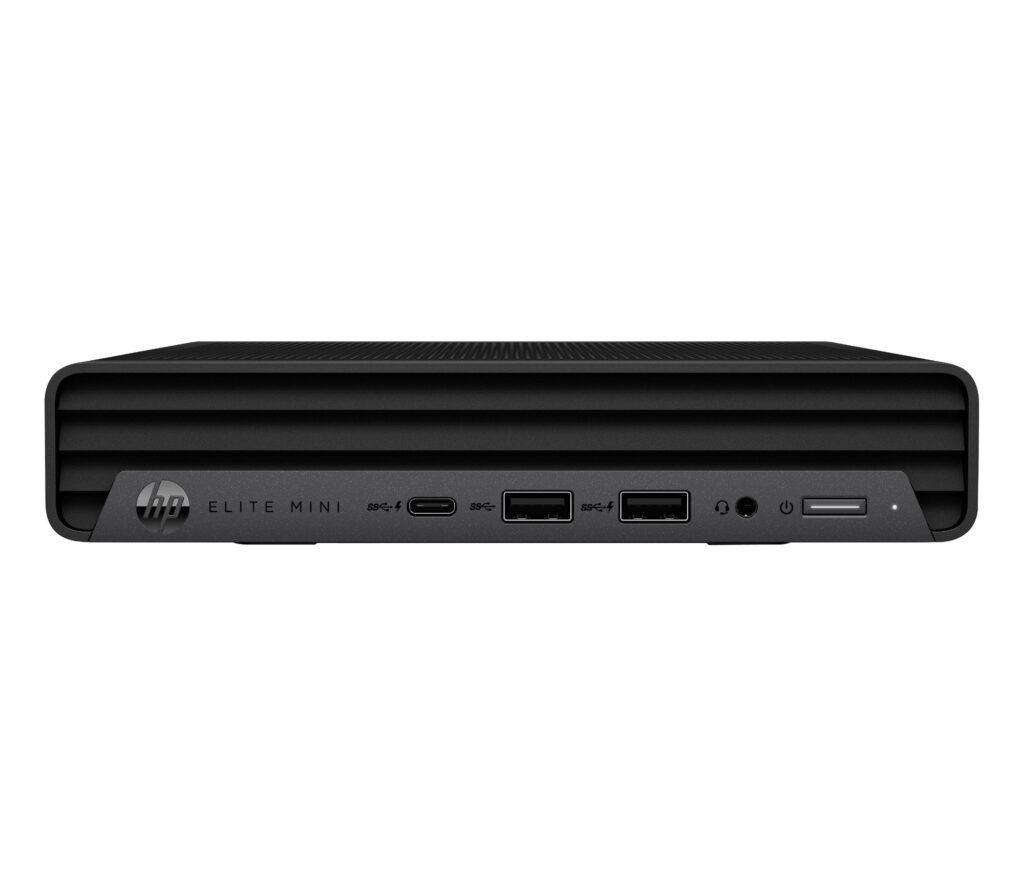
The HP Mini Conference G9 PC is specifically designed for use with Microsoft Teams Rooms, which simplifies the user experience significantly. By reducing the technical barriers typically associated with virtual meetings, it empowers teams to focus on effective communication rather than technical configurations. Its compact design is a notable advantage, fitting well into various meeting room setups without taking up unnecessary space.
For small to medium-sized businesses, the HP Mini Conference G9 PC presents itself as an entry-level solution that combines essential features with ease of use. Its ability to connect with up to two displays enhances productivity, making it suitable for collaborative tasks. However, potential buyers should be aware of its limitations, particularly its reliance on Microsoft Teams Rooms and the need for additional peripherals like cameras and microphones to fully realize its capabilities.
Pros
- Quick setup eliminates configuration headaches.
- Supports integration with existing audiovisual equipment.
- Compatible with Microsoft Teams Rooms, enhancing user experience.
- Compact design saves space in meeting rooms.
- Ability to connect up to two displays for improved productivity.
- Rich collaborative features enhance remote and hybrid meetings.
Cons
- Limited to Microsoft Teams Rooms, which may restrict flexibility for some users.
- No built-in camera or microphone, requiring additional peripherals.
- Performance may not match higher-end conferencing solutions in larger setups.
- Lacks USB-C ports, limiting connectivity options with newer devices.
In Depth
Integration with Existing Systems
One of the key advantages of the HP Mini Conference G9 PC is its compatibility with existing audiovisual equipment. It supports touch-control panels, which can simplify user interactions during meetings. This integration capability means that businesses can leverage their current setups without the need for extensive overhauls, saving both time and money.
Moreover, the ability to connect up to two displays allows for enhanced visual collaboration. This feature is particularly beneficial in hybrid work environments where participants may be both in-person and remote. By providing a more comprehensive view of content and participants, the G9 PC can help facilitate more effective discussions.
Ease of Setup and Use
The HP Mini Conference G9 PC is lauded for its quick setup process, which eliminates the configuration headaches often associated with traditional conferencing solutions. This ease of use is crucial for teams that may not have dedicated IT support, as it allows them to get started with minimal technical knowledge.
In practice, this means that users can focus on their meetings rather than troubleshooting technical issues. The streamlined setup is especially important in time-sensitive environments where every minute counts, making the G9 PC a practical choice for busy professionals.
Limitations of the Device
Despite its advantages, the HP Mini Conference G9 PC does have some limitations that potential buyers should consider. Primarily, its compatibility is restricted to Microsoft Teams Rooms, which could be a drawback for organizations that utilize other conferencing platforms. This limitation may restrict flexibility for some users and could necessitate additional solutions for those who need broader compatibility.
Additionally, the device does not come with a built-in camera or microphone, meaning that organizations will need to invest in these peripherals separately. This added expense could deter some potential buyers, particularly smaller businesses with limited budgets.
Connectivity Options
The HP Mini Conference G9 PC features a compact design, but it lacks USB-C ports, which limits connectivity options with newer devices. This absence could pose challenges for users who rely on USB-C for connecting laptops, smartphones, or other peripherals. As technology evolves, compatibility with the latest standards becomes increasingly important, and this could be a significant drawback for future-proofing the device.
While it does offer essential connectivity options, businesses should assess their current and future needs to determine if the G9 PC will adequately support their operational requirements. The lack of USB-C may necessitate additional adapters or solutions, adding to the overall cost.
Who It’s For
Small to medium-sized businesses looking for straightforward conferencing solutions.
Remote teams needing a reliable setup for virtual meetings without technical complexities.
Organizations that already utilize Microsoft Teams and want to enhance their meeting rooms.
Use Cases
Small Business Meetings
A small business with limited IT support can utilize the HP Mini Conference G9 PC to host client meetings without the hassle of complex setups. The quick integration with existing audiovisual equipment ensures that meetings can commence promptly, allowing the team to focus on discussions rather than configurations.
Remote Team Collaboration
Remote teams can benefit from the G9 PC by facilitating hybrid meetings that connect both in-office and remote employees. The ability to connect two displays allows for better visibility of participants and shared content, enhancing collaboration during critical discussions.
Corporate Training Sessions
Organizations conducting training sessions can leverage the HP Mini Conference G9 PC to create an interactive learning environment. Its compact design and ease of use ensure that trainers can set up quickly and focus on delivering content effectively.
Also consider


How We Researched This
The evaluation of the HP Mini Conference G9 PC was based on its integration capabilities, ease of use, and compatibility with existing systems. Comparisons were made with similar conferencing PCs, focusing on setup time, user interface, and overall functionality.
We analyzed the device’s support for multiple displays and touch-control panels against competitors in the market to provide insights into its effectiveness in enhancing the meeting experience. Key specifications such as connectivity options and intended use cases were critical in our evaluation process, ensuring a comprehensive understanding of how well the HP Mini Conference G9 PC fits into existing setups.
Frequently Asked Questions
What peripherals are needed for the HP Mini Conference G9 PC?
The HP Mini Conference G9 PC does not include a built-in camera or microphone, so you will need to purchase these peripherals separately to fully utilize its conferencing capabilities.
What platforms is the HP Mini Conference G9 PC compatible with?
The device is primarily designed for use with Microsoft Teams Rooms. Users should consider this limitation if they plan to use alternative conferencing platforms.
How many displays can the HP Mini Conference G9 PC support?
The HP Mini Conference G9 PC can support up to two displays, which enhances productivity by allowing users to view multiple content sources during meetings.
Our Verdict
The HP Mini Conference G9 PC is well-suited for small to medium-sized businesses seeking a straightforward conferencing solution that integrates easily with existing systems. However, organizations that require flexibility beyond Microsoft Teams Rooms or those needing built-in audio and video capabilities may want to explore other options.