Ad: this article contains affiliate links. If you buy through them, we earn a commission at no extra cost to you. Our reviews are based on research into manufacturer specifications, retailer information and published sources; we have not tested every product ourselves. Prices and stock change often, so check the retailer before you buy.
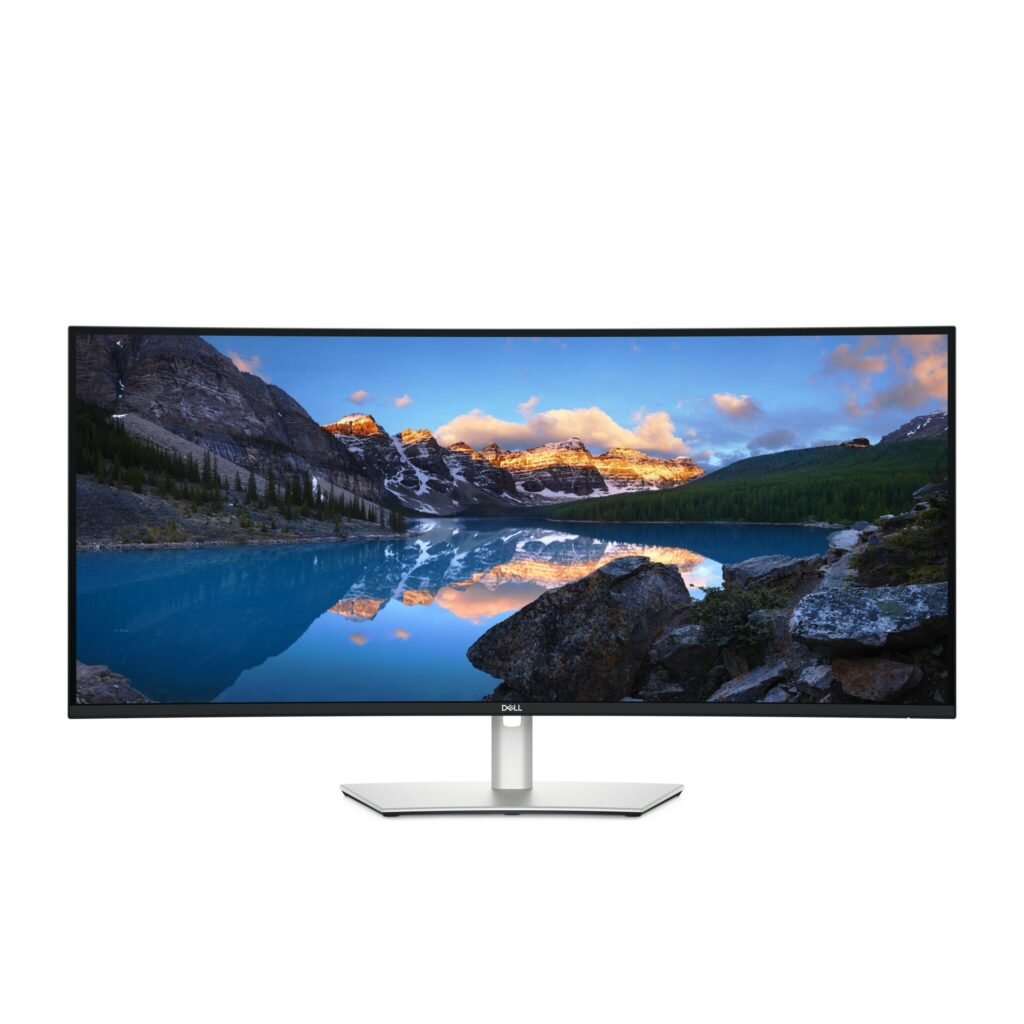
For professionals who demand high-resolution displays, the Dell UltraSharp 40″ 5K monitor presents a compelling solution. Whether you’re working on graphic design, video editing, or data analysis, the need for clarity, color accuracy, and screen real estate is paramount. This monitor not only addresses these needs but also integrates a Thunderbolt hub for enhanced connectivity.
The Dell UltraSharp U4025QW features a 5K resolution of 5120 x 2160 pixels, offering a native aspect ratio of 21:9. This allows for an expansive viewing area that is particularly beneficial for multitasking, allowing users to have multiple windows open side by side without sacrificing detail. Positioned in the professional tier of Dell’s monitor lineup, this product combines impressive specifications with practical functionality.
One of the standout features is its 120Hz refresh rate, which is beneficial for tasks that require smooth motion, such as gaming or video playback. Additionally, the monitor includes a built-in USB hub with multiple ports, facilitating easy connections to various devices. This makes it a versatile choice for both creative professionals and general users looking to improve their workspace efficiency.
In terms of energy consumption, the monitor is rated F for SDR and G for HDR, which indicates moderate energy usage. However, its capabilities may justify the operational costs for users who prioritize performance and display quality.
Pros
- High 5K resolution enhances detail and clarity
- Wide color gamut with 99% DCI-P3 and 100% sRGB coverage
- Extensive connectivity options including Thunderbolt 4 and USB Power Delivery
- Ergonomic adjustments for customizable comfort
- Curved design for improved immersion and reduced eye strain
Cons
- Moderate energy efficiency rating may increase running costs
- Built-in speakers may not satisfy audio quality needs
- Limited height adjustment compared to some competitors
- High price point may not suit all budgets
In Depth
Display Quality and Performance
The Dell UltraSharp U4025QW’s 5K Ultra HD resolution ensures that images are sharp and detailed, making it suitable for creative professionals who rely on precise visuals. With a peak brightness of 600 cd/m² and a typical brightness of 450 cd/m², the monitor performs well in various lighting conditions, enhancing visibility and reducing glare.
The IPS panel technology provides wide viewing angles of 178° both horizontally and vertically, ensuring consistent color representation from different positions. This is particularly advantageous for collaborative work, where multiple people need to view the screen simultaneously without experiencing color distortion.
Connectivity Options
Equipped with two Thunderbolt 4 ports and multiple USB Type-C and Type-A ports, the U4025QW offers extensive connectivity options that cater to modern workflows. The inclusion of HDMI 2.1 and DisplayPort 1.4 ensures compatibility with a range of devices, from laptops to gaming consoles. The USB Power Delivery feature allows for charging devices up to 140W, which can eliminate the need for additional power adapters in a cluttered workspace.
Moreover, a built-in KVM switch enables users to control multiple computers using a single keyboard and mouse setup, which can greatly streamline productivity, especially for those managing different systems for various tasks.
Ergonomics and Design
The monitor’s ergonomic design includes height adjustment (up to 15 cm), tilt, and swivel capabilities, allowing users to customize their viewing experience for comfort during extended use. Its curved screen with a curvature rating of 2500R enhances immersion by providing a more natural viewing angle, which can reduce eye strain over long periods.
The aesthetic design, featuring a silver frame and black bezel, fits well in professional environments, adding a touch of elegance to any workspace. Cable management features further help maintain a tidy setup, ensuring that the workspace remains organized.
Limitations and Energy Considerations
Despite its impressive specifications, the Dell UltraSharp U4025QW has some limitations. The monitor has an energy efficiency class of F for SDR, which may result in higher electricity bills compared to more energy-efficient models. Users should consider the long-term operational costs, especially if the monitor is used extensively.
Additionally, while the built-in speakers provide basic audio output, they may not meet the expectations of users seeking high-quality sound for multimedia tasks. External speakers or headphones may be necessary for an optimal audio experience, which adds to the overall setup cost.
Who It’s For
Graphic designers needing precise color accuracy
Video editors requiring high-resolution displays for detailed work
Professionals managing multiple systems with a KVM switch setup
Use Cases
Graphic Design Work
A graphic designer can benefit greatly from the high resolution and color accuracy of the Dell UltraSharp U4025QW. The monitor’s ability to display 1.07 billion colors allows for precise adjustments in design work, ensuring that the final output matches the intended vision.
Video Editing Projects
For video editors, the 120Hz refresh rate and high resolution provide a smooth editing experience, allowing for accurate frame-by-frame analysis. The large screen real estate makes it easier to manage timelines and multiple clips simultaneously.
Multitasking in a Professional Environment
In an office setting, professionals can take advantage of the monitor’s extensive connectivity options and built-in KVM switch to manage multiple computers efficiently. This setup can streamline workflow and reduce the clutter of multiple monitors.
Also consider


How We Researched This
This review is based on the specifications provided by the manufacturer and retailer data. Key attributes such as display quality, connectivity options, and ergonomic features were examined to determine the monitor’s suitability for various professional tasks.
Comparison was made against similar models in the market, focusing on resolution, refresh rates, and energy efficiency. The Dell UltraSharp U4025QW was assessed not only on its technical specifications but also on its practical applications for users in creative and professional environments.
Frequently Asked Questions
What are the main connectivity options available?
The Dell UltraSharp U4025QW includes two Thunderbolt 4 ports, multiple USB Type-C and Type-A ports, one HDMI 2.1 port, and one DisplayPort 1.4. This variety allows for flexible connections to various devices.
Is the monitor suitable for gaming?
While the 120Hz refresh rate provides smooth motion, the Dell UltraSharp U4025QW is primarily designed for professional use. Gamers might want to consider monitors specifically optimized for gaming performance.
What is included in the package?
The package includes the monitor stand, AC power cable, DisplayPort cable, HDMI cable, Thunderbolt cable, USB Type-A to USB Type-C cable, and a quick start guide. Ensure you have all necessary cables for your setup.
Our Verdict
The Dell UltraSharp 40″ 5K monitor is an excellent choice for professionals who require high-resolution displays with advanced connectivity options. However, users should consider their specific needs and budget before making a purchase, as its higher price point may not appeal to everyone.
Where to buy
Best for: Graphic designers needing precise color accuracy
We earn a commission if you buy through these links, at no extra cost to you. How we make money