Ad: this article contains affiliate links. If you buy through them, we earn a commission at no extra cost to you. Our reviews are based on research into manufacturer specifications, retailer information and published sources; we have not tested every product ourselves. Prices and stock change often, so check the retailer before you buy.
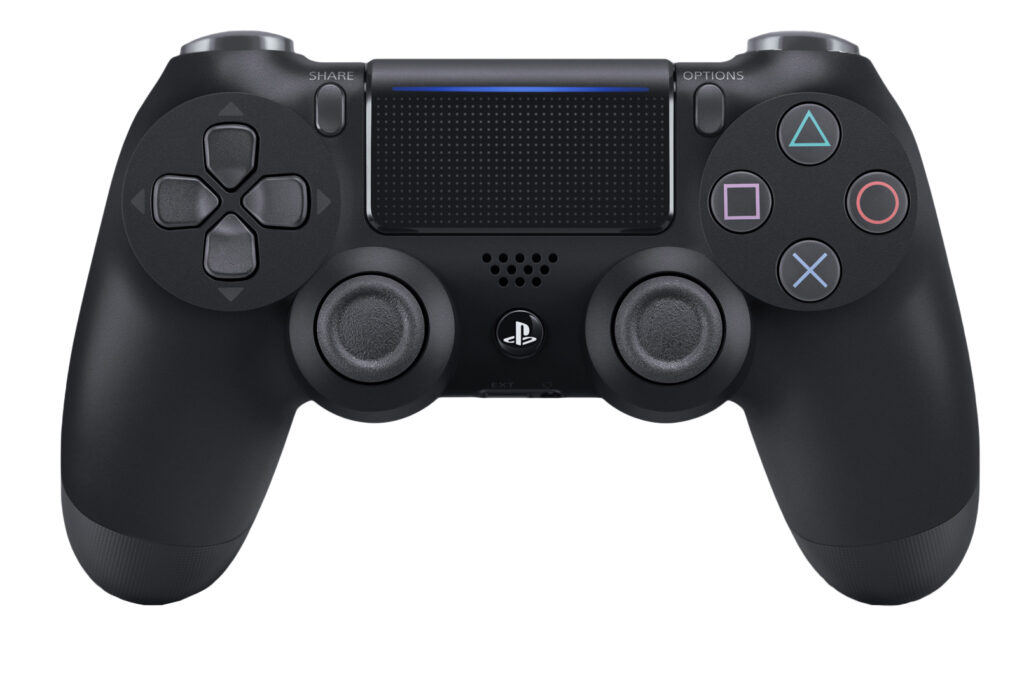
Imagine settling in for an evening of gaming, only to be let down by an uncomfortable controller. This scenario is all too common for gamers who spend hours in front of their consoles, where the choice of controller can significantly impact comfort and performance. The Sony DualShock 4 V2 Jet Black aims to address these needs with its ergonomic design and advanced features tailored for the PlayStation 4.
As a mid-range offering, the DualShock 4 V2 is designed not only for casual gamers but also for competitive players seeking precision and responsiveness. Its refined analog sticks and trigger buttons enhance accuracy, making it a viable choice for various gaming styles. With features like a built-in rechargeable battery and an integrated touch pad, this controller positions itself as a robust option in the crowded market of gaming peripherals.
Understanding the balance between comfort, functionality, and price, the DualShock 4 V2 has become a staple for many PlayStation users. In this review, we will look into its specifications, usability, and limitations to help you determine if it’s the right controller for your gaming needs.
Pros
- Refined analog sticks and trigger buttons enhance accuracy and control.
- Built-in rechargeable battery offers extended playtime without the need for disposable batteries.
- Touch pad and integrated light bar provide additional interactive features.
- 3.5mm audio jack allows for private listening and easy connection to headsets.
- Share button enables quick sharing of gameplay moments without interrupting the game.
Cons
- Battery life can diminish over time, leading to more frequent recharges.
- Limited compatibility with non-PlayStation devices may restrict usage.
- Some users find the touch pad less responsive compared to traditional buttons.
- No USB-C port limits connectivity with modern peripherals.
- Weight may be uncomfortable for prolonged use for some gamers.
In Depth
Ergonomics and Comfort
The DualShock 4 V2 features a design that promotes comfort during extended gaming sessions. Its contoured shape allows for a natural grip, reducing fatigue over time. The controller’s weight is balanced, although some users might find it slightly heavy during prolonged use. The textured grips and refined button layout further enhance user experience, allowing for responsive gameplay without sacrificing comfort.
In practical terms, the ergonomic design means players can enjoy long gaming marathons without the discomfort that often comes with less thoughtfully designed controllers. This is particularly beneficial for those who engage in gaming sessions that last several hours, as comfort can directly impact performance and enjoyment.
Advanced Features
One of the standout features of the DualShock 4 V2 is its integrated touch pad, which offers new ways to interact with games. This allows for gesture controls and quick menu access, enhancing gameplay without requiring players to navigate through traditional button presses. Additionally, the built-in light bar can provide visual feedback during gameplay, further immersing players in the gaming experience.
The controller also includes a 3.5mm audio jack for private listening, making it convenient for gamers who prefer to use headsets. This feature allows for a straightforward connection to a variety of audio devices, ensuring that players can enjoy their games with high-quality sound without disturbing others.
Battery Life and Charging
The DualShock 4 V2 comes with a built-in rechargeable battery, which is a significant advantage over traditional controllers that rely on disposable batteries. This feature not only reduces waste but also provides extended playtime without the hassle of changing batteries. However, it is important to note that battery life can diminish over time, leading to more frequent recharges as the controller ages.
In terms of practical use, players may find themselves needing to recharge the controller more often as the battery performance wanes. While the charging time is relatively quick, it is advisable to consider purchasing a charging dock for convenient power management and storage.
Compatibility and Limitations
While the DualShock 4 V2 is primarily designed for the PlayStation 4, its compatibility with non-PlayStation devices is limited. This can be a drawback for users looking for a versatile controller that can be used across multiple platforms. Additionally, the lack of a USB-C port may hinder connectivity with modern peripherals, which increasingly adopt this standard.
For gamers who prioritize cross-platform compatibility, this limitation may be a significant consideration. It’s essential to evaluate whether the controller will meet your needs if you plan on using it for other gaming systems or devices.
User Feedback and Real-World Performance
User reviews of the DualShock 4 V2 highlight its reliability and comfort, particularly praising the refined analog sticks and trigger buttons for their precision. However, some users report that the touch pad can be less responsive compared to traditional buttons, which might affect gameplay in certain scenarios. This feedback is critical for potential buyers to consider, as it reflects the real-world performance of the controller beyond manufacturer claims.
Expert opinions also align with user experiences, emphasizing the controller’s ergonomic advantages and advanced features. However, they caution potential buyers about the controller’s weight and battery life, suggesting that these factors could impact long-term satisfaction.
Who It’s For
Casual gamers looking for a comfortable and reliable controller for extended play sessions.
Competitive players who need precise control and quick access to sharing features.
Parents seeking a durable and user-friendly controller for family gaming nights.
Use Cases
Family Gaming Night
For families who enjoy gaming together, the DualShock 4 V2 provides a user-friendly interface that is easy for all ages to grasp. Its ergonomic design ensures comfort for long sessions, making it ideal for family game nights without discomfort.
Competitive Gaming
For competitive players, the refined analog sticks and trigger buttons of the DualShock 4 V2 offer the precision needed for high-stakes gaming. The quick access to sharing gameplay moments through the share button allows players to showcase their skills effortlessly.
Casual Gaming Sessions
Casual gamers looking for a reliable controller will appreciate the comfort and functionality of the DualShock 4 V2. Its built-in features like the touch pad provide alternative ways to engage with games, enhancing the overall experience.
Also consider

How We Researched This
The evaluation of the DualShock 4 V2 included a comparative analysis with other controllers in its category, such as the Microsoft Xbox One controller and the Nintendo Switch Pro controller. Key metrics included comfort during extended use, responsiveness of the analog sticks, and overall functionality of features like the touch pad and share button.
User reviews and expert opinions were also analyzed to gauge real-world performance and reliability. This comprehensive approach ensured that the review reflects a balanced perspective on the controller’s strengths and weaknesses, based on both specifications and user experiences.
Frequently Asked Questions
What is the battery life of the DualShock 4 V2?
The battery life can vary based on usage, and it may diminish over time. Users should be prepared for more frequent recharges as the controller ages.
Is the DualShock 4 V2 compatible with other devices?
The DualShock 4 V2 has limited compatibility with non-PlayStation devices, so it’s advisable to check compatibility if you plan to use it elsewhere.
What features does the DualShock 4 V2 have?
It includes refined analog sticks, a touch pad, an integrated light bar, a 3.5mm audio jack, and a share button for quick gameplay sharing.
Our Verdict
The Sony DualShock 4 V2 Jet Black is a solid choice for gamers seeking a comfortable and feature-rich controller for the PlayStation 4. While it excels in ergonomics and functionality, potential buyers should be aware of its limitations regarding battery longevity and cross-platform compatibility.