Ad: this article contains affiliate links. If you buy through them, we earn a commission at no extra cost to you. Our reviews are based on research into manufacturer specifications, retailer information and published sources; we have not tested every product ourselves. Prices and stock change often, so check the retailer before you buy.
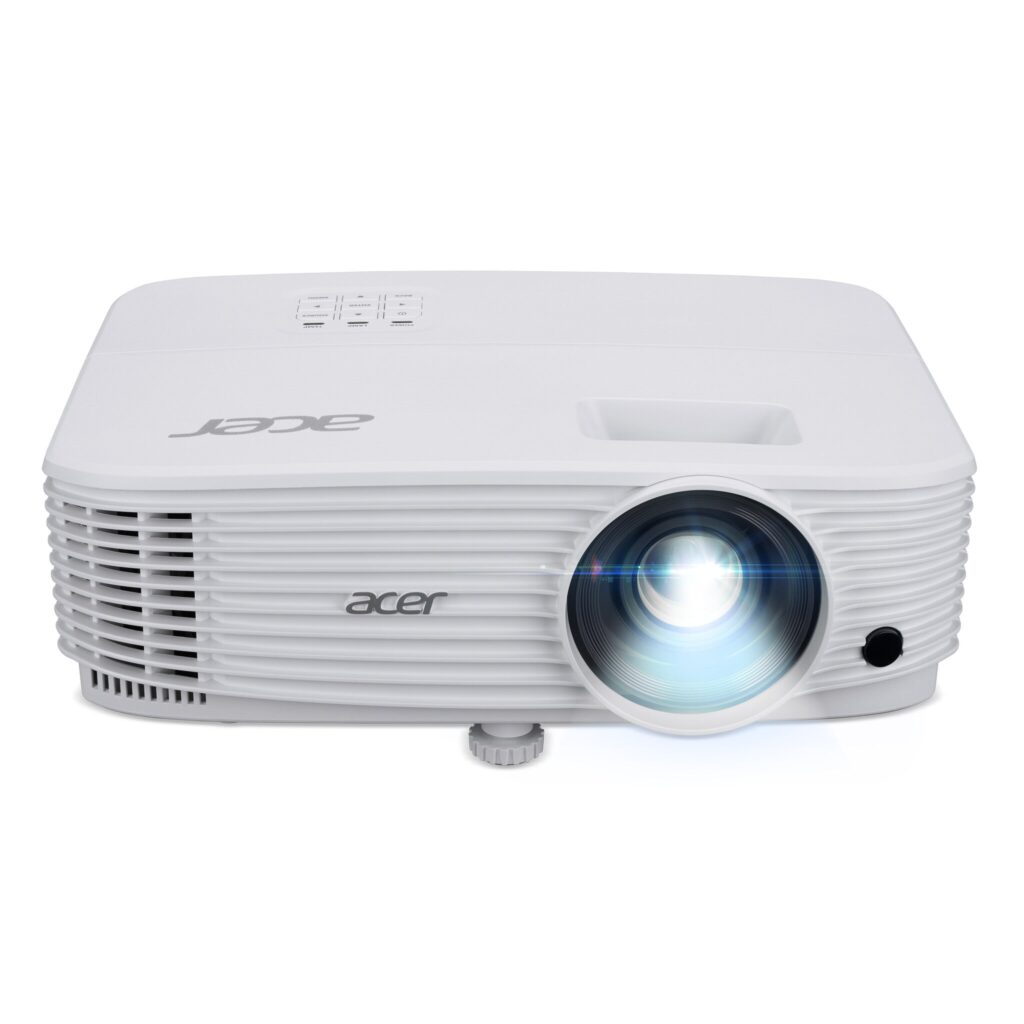
In the age of home entertainment, many consumers are seeking a reliable projector that can deliver high-quality visuals without breaking the bank. The Acer X1526 DLP 1080P projector aims to meet this demand with its impressive specifications and features tailored for both casual and more serious viewing environments.
With a brightness of 4000 ANSI lumens, this projector is designed to perform well in various lighting conditions, making it suitable for home theaters, business presentations, and even outdoor movie nights. The native resolution of 1080p (1920×1080) ensures that viewers can enjoy sharp and detailed images, which is increasingly important as more content becomes available in high definition.
Positioned as a standard throw projector, the Acer X1526 offers flexibility in terms of installation and screen size compatibility, supporting projections from 20 to 300 inches. This versatility, combined with its manual zoom and focus capabilities, allows users to customize their viewing experience according to their specific needs.
Pros
- High brightness level of 4000 ANSI lumens
- Native 1080p resolution for clear image quality
- Supports screen sizes from 20 to 300 inches
- Multiple connectivity options including two HDMI ports
- Manual zoom and focus for customized viewing
- Includes a built-in speaker for basic audio output
Cons
- Standard throw design may limit placement options in small rooms
- No 3D support or smart TV features
- Higher operational costs due to lamp replacement
- Built-in speaker may not suffice for larger audiences
- Limited network connectivity options
In Depth
Brightness and Image Quality
The Acer X1526 features a brightness rating of 4000 ANSI lumens, which is a significant advantage for users who plan to use the projector in well-lit environments. This level of brightness ensures that images remain clear and vibrant, even when ambient light cannot be completely controlled. For instance, in a conference room with natural light, the X1526 would still produce a visible image, which is crucial for effective presentations.
Additionally, the native resolution of 1080p provides a high level of detail, making it suitable for watching movies, sports, and playing video games. This resolution allows users to experience content as intended, with minimal pixelation, especially on larger screens. When considering image quality, it’s essential to pair the projector with a good screen to maximize its capabilities.
Screen Size Compatibility and Throw Ratio
The X1526 supports a screen size range of 20 to 300 inches, making it adaptable for various settings, from small rooms to larger venues. This range allows users to adjust the projected image size based on their space and audience needs, providing a tailored experience. The standard throw ratio means it can be positioned at a moderate distance from the screen, making it a practical choice for home theaters and classrooms alike.
However, the standard throw design may not be ideal for smaller rooms where space is limited. Users with tight setups may find that they need to choose a short throw projector to achieve the desired screen size without compromising on placement flexibility.
Connectivity and Compatibility
Equipped with two HDMI ports and one VGA port, the Acer X1526 allows for multiple device connections, including laptops, gaming consoles, and streaming devices. This versatility ensures that users can connect their preferred devices smoothly, enhancing the projector’s usability in different scenarios.
Moreover, the inclusion of a 3W built-in speaker provides basic audio output; however, users seeking a more immersive experience may want to consider external speakers. While the built-in audio is adequate for casual viewing, it may not suffice for larger gatherings or detailed audio presentations.
Operational Considerations and Running Costs
The projector operates at a typical power consumption of 309W, which is a relevant factor for users concerned about energy usage. While this is reasonable for a projector of this brightness category, it’s important to consider the long-term costs associated with lamp replacement, as this model uses a lamp as its light source.
The operational cost will also depend on usage frequency and lamp lifespan, which can vary. Users should factor in these costs when budgeting for their projector, as they can add up over time, especially for heavy users.
Limitations in Features
While the Acer X1526 provides a solid array of features, it lacks some advanced functionalities found in higher-end models, such as 3D support or smart TV capabilities. This absence may limit its appeal for users looking to leverage the latest in home entertainment technology.
Additionally, the projector does not include network connectivity options, which may be a disadvantage for users who prefer wireless streaming solutions. Those interested in modern functionalities may need to consider alternative models that incorporate these features.
Who It’s For
Home theater enthusiasts who value high-quality visuals
Educators needing a reliable projector for presentations
Casual users looking for a versatile and affordable option
Use Cases
Home Movie Nights
The Acer X1526 is an excellent choice for home movie nights, providing vibrant images and decent sound quality. Its brightness allows for viewing in a semi-lit room, ensuring that family and friends can enjoy films together without straining to see the screen.
Business Presentations
In a business setting, the X1526 can effectively display presentations, graphs, and videos. Its high brightness ensures clarity even in bright conference rooms, making it a reliable tool for professionals needing to convey information clearly.
Educational Use in Classrooms
Teachers can utilize the Acer X1526 for classroom instruction, projecting educational content to a large audience. The projector’s ease of setup and multiple input options make it suitable for various teaching environments.
Also consider

How We Researched This
This review is based on the manufacturer’s specifications, retailer data, and published information regarding the Acer X1526 projector. Key factors considered include brightness, resolution, connectivity options, and overall usability in different settings.
Comparisons were made with similar projectors in the market, focusing on brightness and feature set, to determine the X1526’s position within its category. By analyzing consumer needs and potential use cases, this review aims to provide a comprehensive overview of what the Acer X1526 offers and where it may fall short.
Frequently Asked Questions
What is the maximum screen size for the Acer X1526?
The Acer X1526 supports screen sizes ranging from 20 to 300 inches, allowing for flexible installation based on your space.
Does the projector support wireless connectivity?
No, the Acer X1526 does not have network connectivity options, so users will need to connect devices via HDMI or VGA.
What is the power consumption of the projector?
The projector has a typical power consumption of 309W during operation and 0.5W in standby mode.
Our Verdict
The Acer X1526 DLP 1080P projector is suitable for consumers seeking a reliable and versatile projector for home entertainment, business presentations, or educational purposes. However, those desiring advanced features or wireless connectivity may want to explore other options.
Where to buy
Best for: Home theater enthusiasts who value high-quality visuals
We earn a commission if you buy through these links, at no extra cost to you. How we make money