Ad: this article contains affiliate links. If you buy through them, we earn a commission at no extra cost to you. Our reviews are based on research into manufacturer specifications, retailer information and published sources; we have not tested every product ourselves. Prices and stock change often, so check the retailer before you buy.
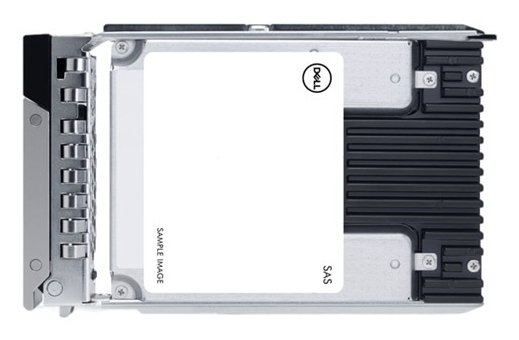
In an era where digital storage demands are ever-increasing, users often face the challenge of slow load times and limited storage capacity. For those utilizing Dell systems, the DELL 345-BJQZ internal solid state drive offers a compelling solution with its 480GB capacity and SATA interface. This SSD is designed to enhance system performance by providing faster data transfer rates compared to traditional hard drives.
The DELL 345-BJQZ SSD is positioned as an entry to mid-range option, catering to casual users and professionals alike. Its solid-state technology minimizes latency and improves reliability, making it a practical choice for anyone looking to upgrade their existing storage solution. This review will look into its specifications, performance, and suitability for various user scenarios to provide a comprehensive understanding of the product.
With its energy-efficient operation, the DELL 345-BJQZ not only enhances performance but also contributes to longer battery life in laptops. As users increasingly prioritize speed and efficiency, this SSD aims to meet those expectations, particularly for tasks involving large files and applications that require quick access. However, it is essential to evaluate its limitations and compare it to competing products in the same category to determine its overall value.
Pros
- Improved speed for booting and loading applications
- 480GB storage capacity for ample data storage
- Reliable performance with reduced latency
- Durable design with no moving parts
- Energy-efficient operation, contributing to longer battery life in laptops
Cons
- Limited to SATA I speeds, which may not fully utilize modern SSD capabilities
- Not the best choice for users needing more than 480GB of storage
- Potentially higher price per GB compared to other brands
In Depth
Storage Capacity and Performance
The DELL 345-BJQZ offers a storage capacity of 480GB, which is adequate for many users, including students and professionals who work with documents, media files, and applications. This capacity allows for the storage of a substantial amount of data while still being manageable for backup solutions. However, for users with larger storage needs, such as gamers or those working with high-resolution media, this capacity may fall short, necessitating additional storage solutions.
In terms of performance, the SSD’s SATA interface provides faster read and write speeds compared to traditional hard drives. While specific speed metrics are not provided, users can generally expect improved boot times and reduced loading times for applications. This enhancement can significantly affect workflow efficiency, particularly for tasks that require frequent file access.
Compatibility and Integration
The DELL 345-BJQZ is specifically designed to integrate with various Dell systems, ensuring compatibility and straightforward installation. This focus on compatibility reduces the potential for installation issues, which can be a concern for users upgrading their existing hardware. The drive is suited for a range of Dell laptops and desktops, making it a convenient option for existing Dell customers.
However, users should verify compatibility with their specific system model before purchasing. While the SSD is optimized for Dell devices, those using non-Dell systems may encounter challenges during installation or functionality, limiting its appeal to a broader audience.
Energy Efficiency and Durability
One of the notable advantages of the DELL 345-BJQZ SSD is its energy-efficient operation. Solid-state drives consume less power than traditional hard drives, contributing to longer battery life in laptops and reduced energy costs for desktop users. This feature is particularly beneficial for mobile professionals who rely on battery performance during travel.
Additionally, the SSD’s design incorporates no moving parts, which enhances its durability compared to mechanical hard drives. This construction minimizes the risk of physical damage from shocks or drops, making it a reliable choice for users who transport their devices frequently.
Limitations and Considerations
Despite its advantages, the DELL 345-BJQZ has some limitations that potential buyers should consider. One significant drawback is its reliance on SATA I speeds, which may not fully leverage the capabilities of newer SSD technology. This limitation could result in suboptimal performance compared to other SSDs that utilize the more advanced SATA III interface.
Moreover, the 480GB storage capacity may not suffice for all users, particularly those who require extensive storage for large files, software, or gaming. In such cases, users might need to explore alternative SSDs with larger capacities or consider external storage solutions.
Who It’s For
Dell system users looking to upgrade their storage capacity, students requiring reliable performance for academic work, and professionals needing quick access to data and applications.
Use Cases
Student Projects
A university student managing multiple projects can benefit from the DELL 345-BJQZ SSD to store documents, presentations, and research materials. The SSD’s speed enhances productivity, allowing for quick access to files during presentations or when conducting last-minute revisions.
Professional Workstations
For professionals working with data-intensive applications, such as graphic design or video editing, the DELL 345-BJQZ offers reliable performance for loading software and accessing large files. However, users should assess if the 480GB capacity meets their storage needs.
Casual Gaming
Gamers seeking to improve load times for their favorite titles may find the DELL 345-BJQZ suitable for their Dell gaming systems. Its performance can enhance the gaming experience, though users with larger game libraries may need additional storage solutions.
Also consider


How We Researched This
The evaluation of the DELL 345-BJQZ SSD was based on a comparison of its specifications with those of other SSDs in the same category. Key metrics analyzed included storage capacity, performance characteristics like read and write speeds, and overall reliability as stated by the manufacturer.
Additionally, the drive’s energy efficiency and durability were considered, particularly in relation to user needs for mobility and reliability. Competing products were reviewed to assess the DELL SSD’s standing in terms of performance and value for money, providing a comprehensive overview of its market position.
Frequently Asked Questions
What is the storage capacity of the DELL 345-BJQZ?
The DELL 345-BJQZ has a storage capacity of 480GB, which is suitable for storing a variety of files and applications, although it may not be sufficient for users with larger storage needs.
Is the DELL 345-BJQZ compatible with non-Dell systems?
While the DELL 345-BJQZ is designed for Dell systems, compatibility with non-Dell systems may vary. Users should verify compatibility with their specific hardware before purchasing.
What type of interface does the DELL 345-BJQZ use?
The DELL 345-BJQZ uses a SATA interface, which provides improved data transfer speeds compared to traditional hard drives but is limited to SATA I speeds.
Our Verdict
The DELL 345-BJQZ is a suitable upgrade for Dell users seeking improved speed and reliability in their storage solutions. However, potential buyers should consider their specific storage needs and compatibility with their systems before making a purchase.